
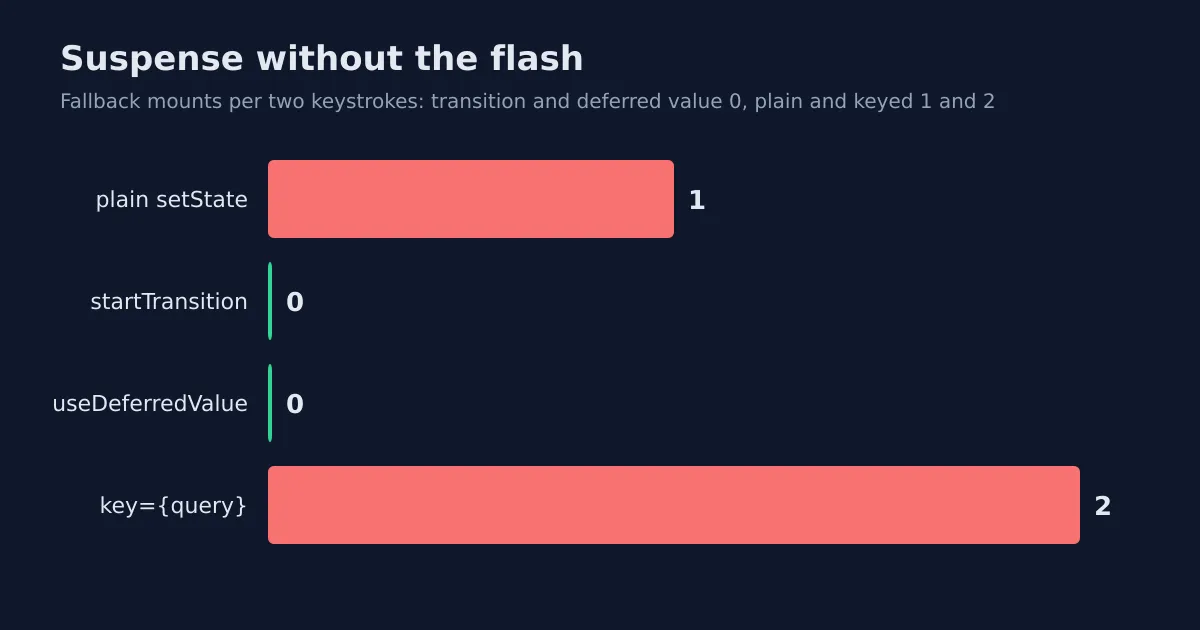
I ran everything below on react and react-dom 19.3.1, TypeScript 6.0.3 under strict, Chromium 153.0.8010.12 driven by Playwright, and Node 22.23.4. The counts come from a MutationObserver watching the page. They don't depend on how busy your machine is. I didn't time anything, so there are no millisecond claims to doubt.
TL;DR: A boundary that has already revealed content won't show its fallback again if the update is a transition or reads a deferred value. A plain
setStateshows it. Akeyon the boundary shows it every time. Never wrap the state of a controlled input in a transition.
Why Does a Revealed Boundary Flash Its Spinner Again?
Take a search box. Type a letter, a child component reads a promise with use(), the promise takes 300 ms, and the boundary above that child shows a fallback until it resolves. The first load needs that fallback. Nobody argues.
The second keystroke is the problem. The results on screen are perfectly good, only slightly out of date, and React throws them away for a spinner because the update was urgent and urgent updates can't wait.
Here's the shared setup. A module-level cache keeps the promise stable across renders (a new promise per render is the classic use() mistake, covered in the use() deep dive).
const cache = new Map<string, Promise<string[]>>();

export function searchCities(query: string): Promise<string[]> {
  const hit = cache.get(query);
  if (hit) {
    return hit;
  }
  const request = new Promise<string[]>((resolve) => {
    setTimeout(() => {
      resolve([`${query}-1`, `${query}-2`, `${query}-3`]);
    }, 300);
  });
  cache.set(query, request);
  return request;
}
And the child that suspends:
function Results({ query }: { query: string }) {
  const items = use(searchCities(query));
  return (
    <ul data-testid="results" data-query={query}>
      {items.map((item) => (
        <li key={item}>{item}</li>
      ))}
    </ul>
  );
}
The first version is the obvious one. One state, one input, one boundary.
function PlainSearch() {
  const [query, setQuery] = useState("a");
  return (
    <>
      <input value={query} onChange={(e) => setQuery(e.target.value)} />
      <Suspense fallback={<p>Loading...</p>}>
        <Results query={query} />
      </Suspense>
    </>
  );
}
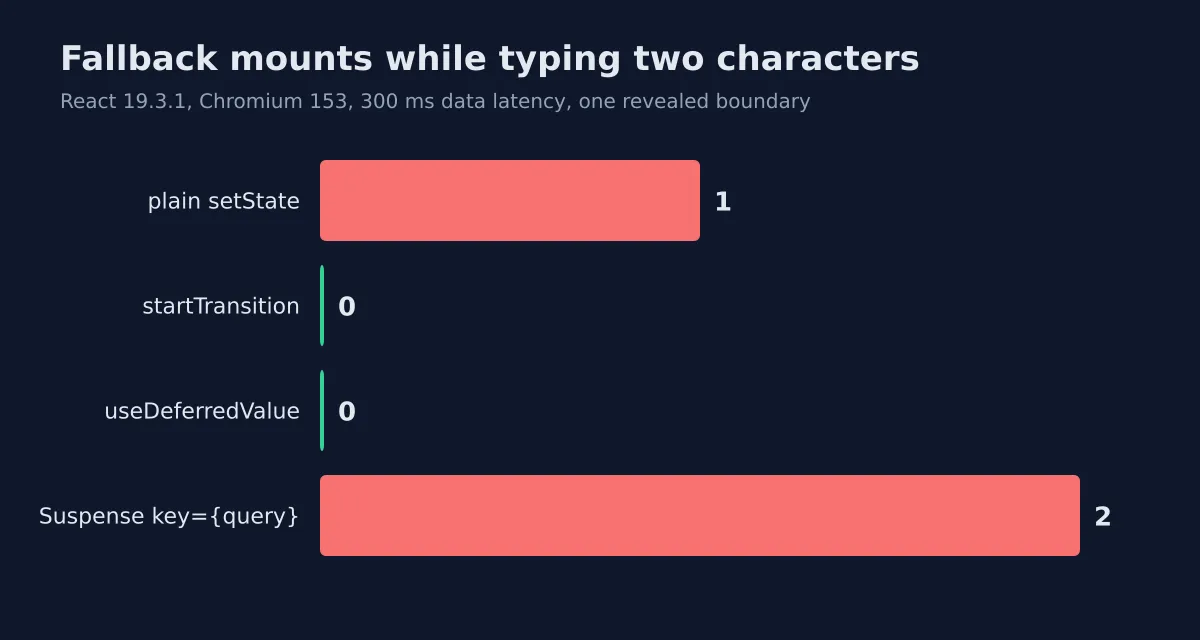
After the first results had painted, I typed bc with a 60 ms gap between keys. The fallback mounted once and stayed until abc resolved. Five fresh pages, same count every time.
How Does startTransition Keep the Old Results?
Mark the query update as a transition and React renders the new tree in the background. If it suspends, React keeps the committed UI and waits. The catch is that you need two pieces of state, because the text in the box must update right now.
function TransitionSearch() {
  const [text, setText] = useState("a");
  const [query, setQuery] = useState("a");
  const [isPending, startTransition] = useTransition();
  return (
    <>
      <input
        value={text}
        onChange={(e) => {
          const next = e.target.value;
          setText(next);
          startTransition(() => {
            setQuery(next);
          });
        }}
      />
      <div data-pending={isPending}>
        <Suspense fallback={<p>Loading...</p>}>
          <Results query={query} />
        </Suspense>
      </div>
    </>
  );
}
Same keystrokes, same page. Fallback mounts: zero. The input showed abc the moment I stopped typing. And isPending went false, true, false, once across both keystrokes, not once per keystroke. That flag is your hook for a dimmed list or a thin progress bar, which is what the old results deserve while they're stale.
Where Does useDeferredValue Fit Better?
Sometimes you don't own the setter. The query arrives as a prop, or it lives in a router, or a library holds it. You can't wrap what you can't call. useDeferredValue solves that from the reading side.
function DeferredSearch() {
  const [query, setQuery] = useState("a");
  const deferredQuery = useDeferredValue(query);
  const isStale = deferredQuery !== query;
  return (
    <>
      <input value={query} onChange={(e) => setQuery(e.target.value)} />
      <div data-stale={isStale}>
        <Suspense fallback={<p>Loading...</p>}>
          <Results query={deferredQuery} />
        </Suspense>
      </div>
    </>
  );
}
Zero fallback mounts again. The stale flag went false, true, false. There's one state variable here, which I like. There's also no isPending from React, so you derive it by comparing the two values, as above.
My rule of thumb: if the update starts in your own event handler, use useTransition. If the value shows up already set, defer it. Both are in the React reference with more edge cases than I'll repeat here.
Why Does a key on the Boundary Undo All of This?
The tempting move is a reset. You want the boundary to reset when the query changes, so you write <Suspense key={query}>. It looks harmless.
It isn't. A new key is a new boundary, and a new boundary has no committed content to hold on to. I put that key on the TransitionSearch boundary, left the startTransition in place, and typed the same two characters. Two fallback mounts, one per keystroke. The transition was still running. It just had nothing left to protect.
Is a reset sometimes what you want? Yes. Switching between two unrelated records, say, where showing stale data for the other record would be misleading. For a search box or a filter, drop the key and let the child read the new value.
What Happens When You Transition the Input Itself?
This one surprised me, and it's the reason I added a fifth variant to the harness. The tempting shortcut is to skip the second state and wrap the only setter in a transition.
function TransitionOnInput() {
  const [query, setQuery] = useState("a");
  const [, startTransition] = useTransition();
  return (
    <>
      <input
        value={query}
        onChange={(e) => {
          const next = e.target.value;
          startTransition(() => {
            setQuery(next);
          });
        }}
      />
      <Suspense fallback={<p>Loading...</p>}>
        <Results query={query} />
      </Suspense>
    </>
  );
}
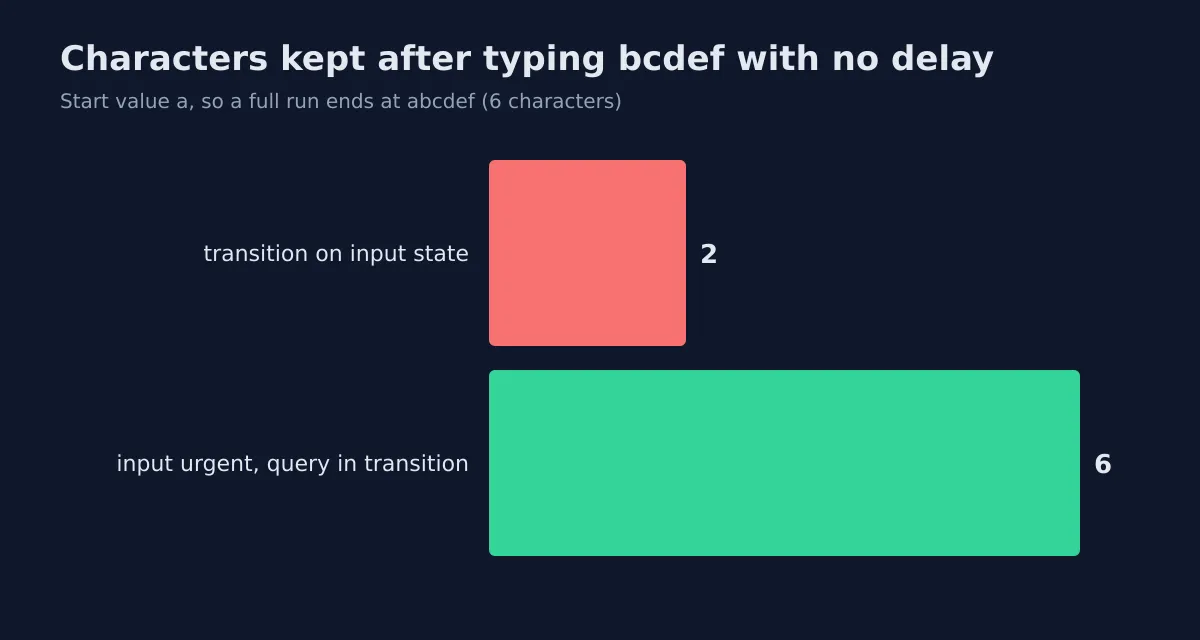
I typed bcdef with delay: 0, which is faster than a person types, so treat the exact result as a stress test. Right after typing, the box still read a. A moment later it settled on af. Four of five characters gone, the same on three runs. The split-state version in the same session ended at abcdef every time.
Why? My reading, not something I traced inside React: a controlled input needs its value committed before the next keystroke, and a transition is allowed to wait, so fast typing outruns it. I didn't test slower typing, so I can't tell you whether a person would see lag or loss. Either one is a bad trade in the field you're typing into.
What Does the First Load Still Cost?
Everything above applies after a boundary has revealed. On the first mount, every variant showed the fallback exactly once, because there was nothing older to keep. Transitions don't fix an empty screen. They only stop you from making a full one empty again.
So size that first fallback properly, which is the subject of the Suspense boundary pattern guide. If you want a view animation on the reveal, ViewTransition measured in a real browser covers how React triggers it. And if a transition doesn't seem to help, check whether the real cost is a long task rather than a fetch: Why Your UI Freezes measures startTransition against a blocked main thread.
What I'd Ship
For a search or filter box that suspends: split state, useTransition, an isPending style that dims the list, and no key on the boundary. For a value I don't control: useDeferredValue and a stale comparison. I'd skip useTransition on the input's own state in every case. That's an opinion, and this is the evidence for it.
What I haven't tested: React Server Components, slow networks with real fetch cancellation, or Safari and Firefox. The counts come from one engine. The semantics are React's, so I'd expect the same fallback behavior elsewhere, but I haven't seen it.
Run It Yourself
The harness is blogs/coding-dunia/examples/react-suspense-transitions-measured/ in the repository. npm install, npx playwright install chromium, npm test. It builds the five variants, types into each one, and asserts every count in this article, including the dropped characters. Your machine should print the same numbers.