
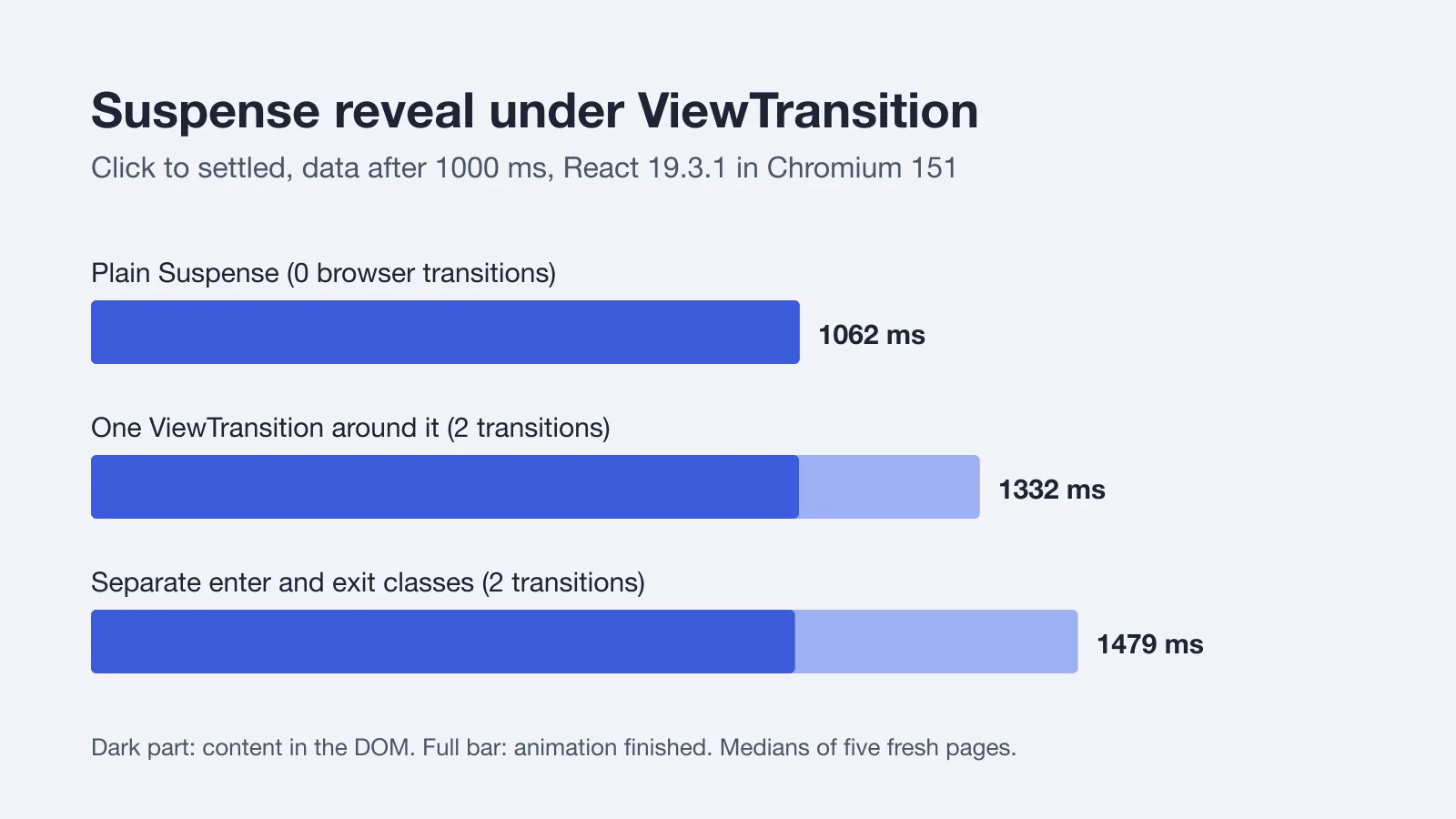
I ran everything below on React and react-dom 19.3.1, Chromium 151.0.7922.34 under Playwright 1.62.1, Node 22.23.3, on an Apple M1 that was busy with other jobs (one-minute load average between 14 and 19 on eight cores). Counts and class names don't care about load. Millisecond figures do, so read them as medians of five fresh pages, not as a promise.
TL;DR:
ViewTransitionis stable in 19.3 andstartViewTransitionis called by React, never by you. A plainsetStatenever triggers it. Wrapping aSuspenseboundary costs two browser transitions, not one, andaddTransitionTypereaches the fallback but not the reveal. React won't honorprefers-reduced-motionfor you.
What Does 19.3 Actually Export?
The release post says ViewTransition shipped as an experimental API last year and is stable in 19.3, which landed on September 9, 2026. I didn't want to take "stable" on faith for the two names I care about, so the harness imports three versions side by side:
| React | ViewTransition | addTransitionType |
|---|---|---|
| 19.2.9 | no | no |
| 19.3.0 | yes | yes |
| 19.3.1 | yes | yes |
If you're still on a 19.2.x patch, neither name exists. Bump to 19.3 first. The React 19 feature guide covers the rest of what the 19.3 line added, and this article stays on one component.
There's one more thing worth knowing before any code. ViewTransition only works in the DOM. The release post says React Native support is being worked on, and nothing more.
When Does React Call the Browser API?
Not as often as you'd guess. The reference page is explicit that React calls startViewTransition itself, "so you should never do that yourself", and that only three kinds of update qualify: a Transition, a Suspense reveal, or useDeferredValue. A bare setState doesn't.
So I tested that sentence. The harness wraps document.startViewTransition before React loads and logs every call. A stepper with a ViewTransition around its content gave me this:
| Click | Calls to startViewTransition |
|---|---|
setStep(s => s + 1) outside a transition | 0 |
the same update inside startTransition | 1 |
Same state, same markup, same boundary. The only difference is whether React considered the update interruptible. That's the first thing to check when somebody tells you "ViewTransition does nothing": open the console, wrap the browser method like I did, and see whether it was ever called.
What Does a Suspense Reveal Cost?
Here is the setup. A button calls startTransition(() => setOpen(true)), which mounts a Suspense boundary around a component that reads a promise with use(). The promise resolves after 50, 300 or 1000 ms. I wrapped it three ways.
// 1. plain: no ViewTransition anywhere
<Suspense fallback={<Skeleton />}>
  <Panel k={key} />
</Suspense>

// 2. "update": one wrapper, fallback and content share a name
<ViewTransition>
  <Suspense fallback={<Skeleton />}>
    <Panel k={key} />
  </Suspense>
</ViewTransition>

// 3. "enter/exit": the fallback leaves, the content arrives
<Suspense fallback={<ViewTransition exit="reveal-out"><Skeleton /></ViewTransition>}>
  <ViewTransition enter="reveal-in"><Panel k={key} /></ViewTransition>
</Suspense>
Patterns 2 and 3 come straight from the Suspense section of the reference. The CSS for the third is two rules: ::view-transition-new(.reveal-in) runs a 400 ms rise, ::view-transition-old(.reveal-out) a 120 ms fall. Times below are measured from the click.
| Wrapping | Data after | startViewTransition calls | Content in the DOM | Everything settled |
|---|---|---|---|---|
| plain | 50 ms | 0 | 358 ms | 358 ms |
| plain | 1000 ms | 0 | 1062 ms | 1062 ms |
| update | 50 ms | 2 | 394 ms | 674 ms |
| update | 1000 ms | 2 | 1061 ms | 1332 ms |
| enter/exit | 50 ms | 2 | 393 ms | 812 ms |
| enter/exit | 1000 ms | 2 | 1055 ms | 1479 ms |
Three things jump out.
Two calls, always. Showing the fallback is one view transition, revealing the content is another. If you wrote one ViewTransition and expected one animation, you got two, and the first is the skeleton fading in.
The 358 ms row. Data arrived after 50 ms and the content still took 358 ms. That isn't ViewTransition. The plain version has no ViewTransition at all. React's own source defines FALLBACK_THROTTLE_MS = 300 in react-dom 19.3.1, which matches the 358 ms: a fresh fallback stays up for about that long before the content replaces it. Fast data gets a 300 ms skeleton whether you animate it or not, which makes the fade-in of that skeleton a strange thing to polish.
The animation tail. With slow data the reveal itself adds about 270 ms to the update pattern (1332 against 1061) and 424 ms to the enter/exit pattern, because my custom rise runs 400 ms. With fast data the transition also pushed the content into the DOM 35 or 36 ms later than the plain run. That fits the reference page's statement that React waits for a running view transition to finish before it starts the next one. I didn't instrument the wait itself, so treat the explanation as a likely cause rather than a measured one.
Does a 400 ms rise feel good? I don't think so. The browser's default fade on these pseudo-elements measured 250 ms on every boundary I left unstyled, and I'd keep reveals at or under that.
A Suspense boundary wrapped in ViewTransition makes two browser transitions, so budget for the fallback's fade-in too, not just the reveal.
How Does addTransitionType Pick the Animation?
You call it inside startTransition, next to the state update, and the ViewTransition props take an object keyed by type. The stepper below slides content in from the side the user is heading toward.
function go(dir) {
  startTransition(() => {
    addTransitionType(dir); // 'next' or 'previous'
    setStep((s) => (dir === 'next' ? s + 1 : s - 1));
  });
}

<ViewTransition
  key={step}
  default="none"
  enter={{ next: 'from-right', previous: 'from-left', default: 'none' }}
  exit={{ next: 'to-left', previous: 'to-right', default: 'none' }}
>
  <div className="panel">Step {step}</div>
</ViewTransition>
The class names are plain CSS, each a single ::view-transition-new(.from-right) style rule with a 180 ms keyframe. Here is what the browser reported after each click:
| Click | Types passed to the browser | Animations on React's named boundaries |
|---|---|---|
| Next | ['next'] | old: to-left 180 ms, new: from-right 180 ms |
| Previous | ['previous'] | old: to-right 180 ms, new: from-left 180 ms |
Next, but addTransitionType never called | none | none |
The last row is the one I'd have gotten wrong from the docs alone. With default="none" and no type added, the transition still ran (one call), but no named boundary animated. The addTransitionType reference says a none match disables the boundary without assigning it a name, and the harness agreed: the list of named animations came back empty. That's a good default for a component that sits in an app with other transitions, because nothing moves unless the cause is on your list.
Types also reach CSS directly. React adds each one as a browser view transition type, so :root:active-view-transition-type(next) works. The Chrome page's support box lists the types feature at Chrome 125, Firefox 144 and Safari 18. In my run, the set on the ViewTransition object read ['next'] once ready resolved.
Now the catch. The addTransitionType reference says types reset after every commit, so a Suspense fallback picks them up and the later reveal doesn't. I checked that too, by adding the type open to the update that mounts a boundary:
| Commit | Types |
|---|---|
| fallback appears | ['open'] |
| content reveals | none |
If your design needs "slide in from the right" to apply to both halves, don't key it on a type. Put the class on the enter prop directly and keep types for the cause of navigation, which is what they're for.
What About prefers-reduced-motion?
React doesn't handle it. The reference page tells you to use the media query yourself. I wanted to see what that means in practice, so I ran the stepper under Playwright's reducedMotion: 'reduce' with nothing else changed. The custom 180 ms slide still ran. Then I added this to the page:
@media (prefers-reduced-motion: reduce) {
  ::view-transition-group(*),
  ::view-transition-old(*),
  ::view-transition-new(*) {
    animation: none !important;
  }
}
After that the named boundaries had no animations at all, and the whole transition finished in about 49 ms instead of roughly 300 ms. The Chrome documentation adds a caveat worth repeating: reduced motion doesn't necessarily mean no motion, and a gentler cross-fade can still show how elements relate. I used none because it's the one rule I could verify in a single line. Your design may want a short fade instead.
Why does the transition take about 300 ms when my slide is only 180? Because the root snapshot still runs the browser's default 250 ms fade-out, and the transition lasts as long as its longest animation.
What I'd Ship
Opinions, since the data allows a few. Use the update pattern, one wrapper, as the default for lazy panels. The enter/exit pattern is worth it only when the skeleton and the content differ enough that a cross-fade looks like a mistake. Keep default="none" on any boundary inside a shared layout so route-level transitions don't make it dance. Put the reduced-motion rule in your global stylesheet once.
And don't skip the back button. The reference says React skips animations from popstate, so a router that doesn't use the Navigation API will animate forward and snap on back. That's easy to miss in a demo that only has a Next button.
The browser side of this story, including the cross-document version for multi-page sites, lives in the View Transitions API guide. If the thing you're animating is a lazy chunk rather than data, the code splitting guide for React 19 covers where the boundary should sit, and Suspense data fetching patterns explains why the promise in my harness is cached outside the component.
Run It Yourself
The harness is blogs/coding-dunia/examples/react-view-transition-measured/ in the repository. npm install, npx playwright install chromium, npm test. It asserts every count and class name in this article and prints the timings. Mine will differ from yours. The counts shouldn't.