
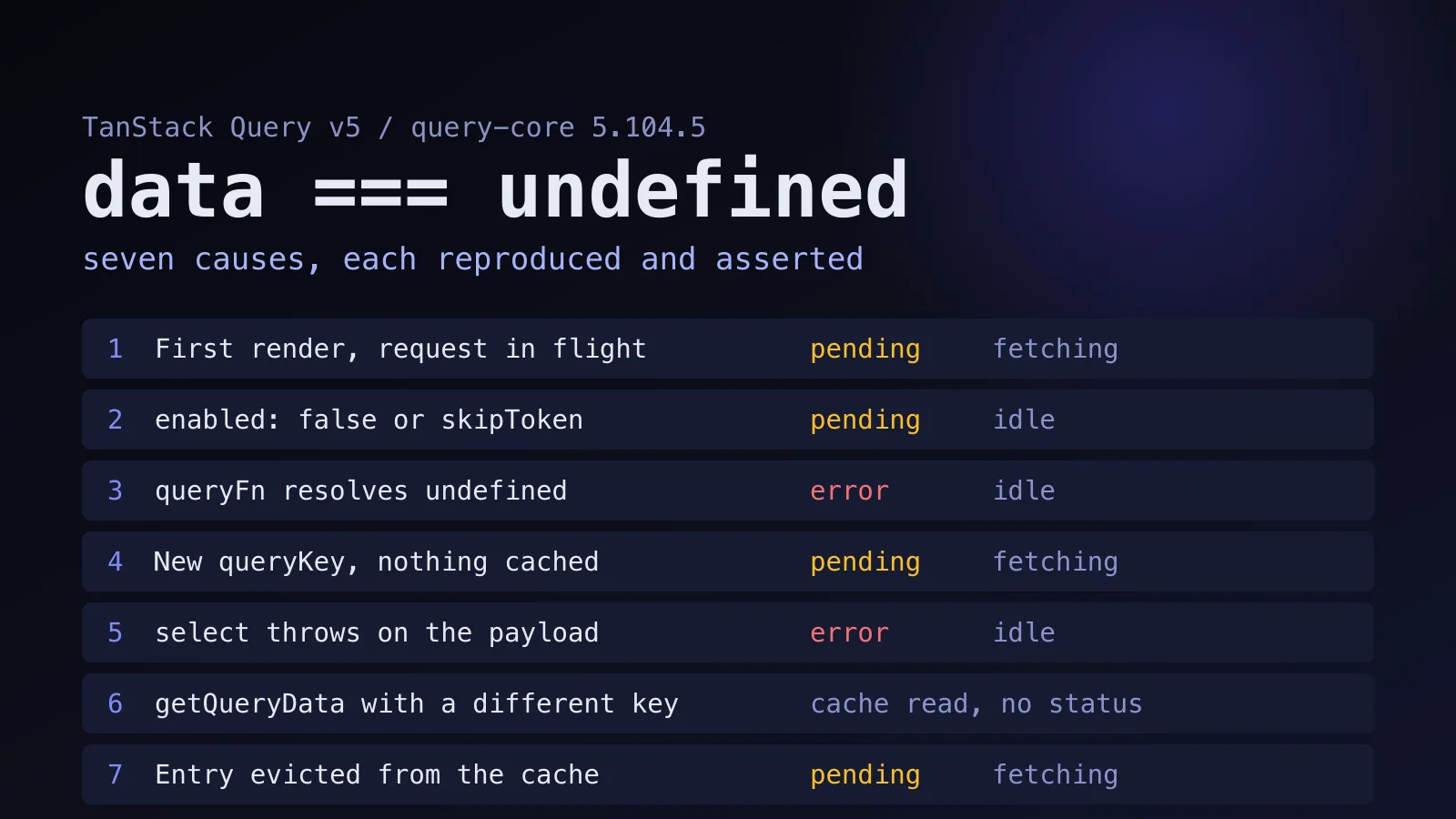
Seven situations. That's how many different ways I found data coming back undefined from a TanStack Query v5 hook, and each one needs a different fix. The usual cure, sprinkling data?. across the component, makes the error go quiet and leaves you not knowing which of the seven you're in.
I installed @tanstack/query-core and @tanstack/react-query 5.104.5, the release of 19 October 2026, and ran every case until I could print the exact state. The whole script is in the tanstack-query-data-undefined example. It asserts each result, so it fails loudly if a later release changes one. None of it is a regression in the 5.104 line. Every behavior below matches the documentation, which is exactly why it keeps surprising people.
Read status and fetchStatus before anything else
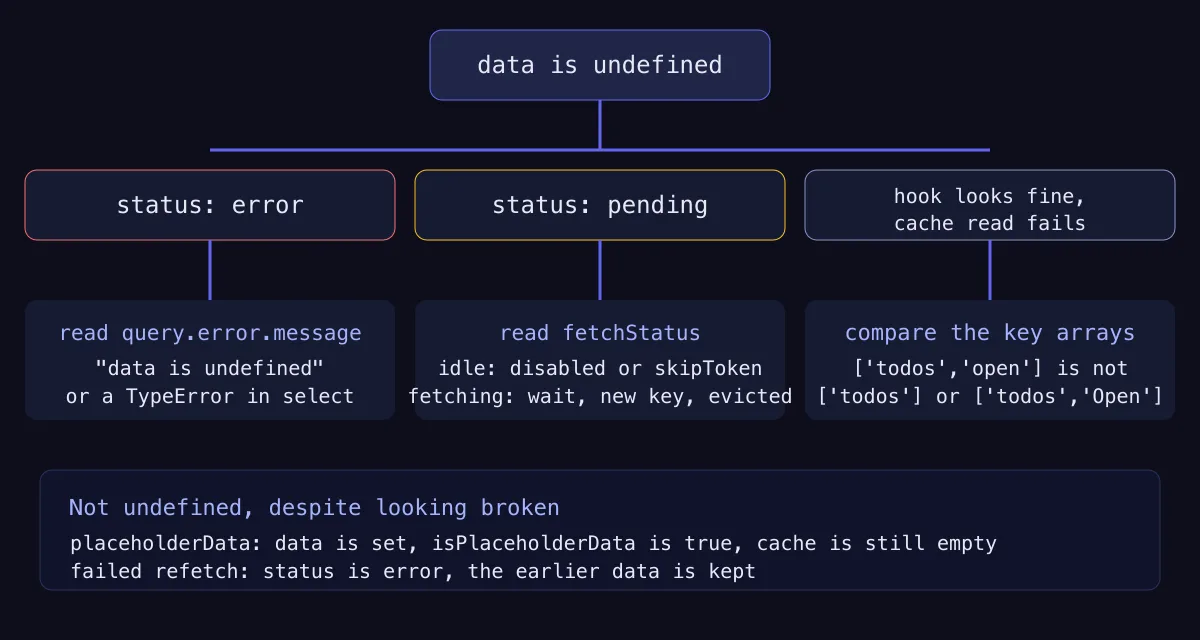
TanStack Query tracks two separate things. status says whether the query has data: pending (no data yet), error, or success. fetchStatus says whether a request is running: fetching, paused or idle. The queries guide spells the split out, and it's the key to everything that follows.
| Cause | status | fetchStatus | error message |
|---|---|---|---|
| First render | pending | fetching | none |
enabled: false or skipToken | pending | idle | none |
queryFn returns undefined | error | idle | ["void"] data is undefined |
New queryKey | pending | fetching | none |
select throws | error | idle | the TypeError itself |
Wrong key in getQueryData | not applicable | not applicable | none |
| Entry evicted | pending | fetching | none |
Two rows share the same pair, and that's where people get lost. A pending, fetching query is one you wait for. A pending, idle query is one that will never run until something changes.
1. The first render, before the request returns
This is the common one. A query with nothing in the cache starts pending, with data undefined, and the component renders once in that state no matter how fast your API is.
function Profile({ id }: { id: string }) {
  const { data } = useQuery({ queryKey: ['user', id], queryFn: () => fetchUser(id) })
  return <p>{data.name}</p>
}
I rendered that with react-dom/server and got TypeError: Cannot read properties of undefined (reading 'name'). TypeScript catches it earlier, if you let it. With strict on and TypeScript 5.9.3, line 3 fails with TS18048: 'data' is possibly 'undefined'.
The fix is to narrow on the status instead of the value:
function Profile({ id }: { id: string }) {
  const query = useQuery({ queryKey: ['user', id], queryFn: () => fetchUser(id) })
  if (query.isPending) {
    return <p>Loading</p>
  }
  if (query.isError) {
    return <p>{query.error.message}</p>
  }
  return <p>{query.data.name}</p>
}
That compiles cleanly with no optional chaining. The result is a discriminated union, so once isPending and isError are handled, TypeScript knows data is a User.
If you'd rather never write the branches, useSuspenseQuery returns data as always defined and moves loading and error handling to a Suspense boundary and an error boundary. I covered that trade in the Suspense data-fetching guide.
2. The query is disabled
Set enabled: false, or pass skipToken as the queryFn, and the query never fetches. In my run both ended at status: 'pending', fetchStatus: 'idle', and isLoading: false.
That last value trips people up. In the library source, isLoading is isPending && isFetching, so a disabled query is pending but not loading. The docs recommend isLoading for a spinner because of that. The catch is what the screen shows instead: a spinner on isPending spins forever for a query that was never going to run, while a spinner on isLoading shows nothing, and data stays undefined behind an empty component. Render an explicit "waiting for an id" state for the disabled case.
const query = useQuery({
  queryKey: ['user', id],
  queryFn: id ? () => fetchUser(id) : skipToken,
})
I prefer skipToken for the "no id yet" case, because TypeScript then lets queryFn take a narrowed id without a non-null assertion. The disabling queries page lists the trade-offs, including that refetch() doesn't work on a skipToken query. Use isPending for "there's no data", and fetchStatus === 'fetching' for "a request is running".
3. The queryFn resolves to undefined
Forget a return and the query fails, with an error that says so in plain terms. My function awaited a call and returned nothing, and the state came back as status: 'error' with the message ["void"] data is undefined. In a development build the library also logs a console error: "Query data cannot be undefined. Please make sure to return a value other than undefined from your query function." The process.env.NODE_ENV !== "production" check sits in the source, so that line disappears in production while the thrown error stays.
// Broken: the braces swallow the value
queryFn: async () => {
  await api.touchUser(id)
}

// Fixed: return something, or null if there's nothing to say
queryFn: async () => {
  await api.touchUser(id)
  return null
}
Return null for "nothing here", or wrap the value in an object. The query functions page says the function must return a promise that resolves data or throws, and the ESLint plugin ships a no-void-query-fn rule that flags a block-bodied queryFn with no return. It costs one line in your lint config, and it catches this before the browser does. If you're on a codebase that already runs a linter gate, add it there.
4. A new queryKey is a new, empty entry
Change the key and you're looking at a different cache entry. If nothing is stored under the new key, the hook goes back to pending and data is undefined, even though the component showed a list a moment ago. I switched from ['page', 1] to ['page', 2] and got data: undefined, status: 'pending', fetchStatus: 'fetching'.
Pagination is where this hurts, because the list flashes empty between pages. placeholderData: keepPreviousData fixes it. With it, my third page showed page-2 while loading, flagged isPlaceholderData: true, then swapped to page-3 when the request landed. The paginated queries page documents the pattern. Watch the flag, though. While isPlaceholderData is true you're looking at the previous page, so a "Next" button that trusts data alone can advance twice.
5. The select function throws
select transforms the cached payload before your component sees it, and it's an easy place to hide a bug. Two things I measured: select isn't called while the query is pending (zero calls before the response, one call after), and an exception inside it doesn't crash the render. It turns into a query error.
select: (payload) => payload.items.lengthWhen the payload had items: undefined, my state was status: 'error', data: undefined, and the error message read Cannot read properties of undefined (reading 'length'). That's the same string as case 1. So if you see this TypeError and your component code looks fine, check query.error before you check the render. Guard inside select, or fix the shape at the source.
6. getQueryData reads a key that was never written
queryClient.getQueryData has nothing to do with hooks. It reads the cache, and a cache key matches only if the whole array matches. After a query stored data under ['todos', 'open'], I read these:
queryClient.getQueryData(['todos', 'open'])             // ['a']
queryClient.getQueryData(['todos', 'Open'])             // undefined
queryClient.getQueryData(['todos'])                     // undefined
queryClient.getQueryData(['todos', 'open', undefined])  // undefined
Three wrong guesses, three undefined results, no warning. Prefix matching works for invalidateQueries and filters, not for reading one entry, which trips people who learned the first and assumed the second. Put your keys in a small factory function and import it everywhere. I'd go further: a getQueryData call with a hand-typed array literal in application code is a smell. If you find yourself writing one, ask whether the data should come through a hook.
7. The entry was evicted
Cached data doesn't live forever. Once nothing observes an entry, it's removed after gcTime. The source sets the default to 300,000 ms (five minutes) in the browser, and Infinity on the server. I set gcTime: 30 for a test, unsubscribed, and waited. getQueryData returned undefined, and mounting the query again started at pending with no data.
queryClient.removeQueries does the same thing on purpose. Both are legitimate, and both explain the "it worked, I went to another route, I came back and it loaded again" report. If five minutes of memory is too short for your screen, raise gcTime for that query. Don't copy it into staleTime, which controls when a refetch happens and has no say over eviction.
Two cases that look broken and aren't
placeholderData makes data defined, and fake. In my run it returned 'draft' with isPlaceholderData: true, while getQueryData still returned undefined, because placeholder data never enters the cache. Code that copies data into a form on first render copies the placeholder.
A failed refetch doesn't clear anything either. A query that had succeeded and then threw on refetch ended with status: 'error' and the earlier data still there. If your screen goes blank on a refetch error, the blanking is your own code treating isError as "no data". Show the old data with a banner instead.
When TanStack Query's data is undefined, read status and fetchStatus first: pending and idle means disabled, pending and fetching means waiting, and error means read error.message.
What I'd do about it
My opinion, and you can argue with it: ban data?. on query results in code review. It turns a precise state into a shrug, and it's how case 3 sat in a codebase for weeks, because a queryFn that returned nothing looked like an API that returned nothing. Narrow on isPending and isError instead. Use skipToken for conditional queries, add the lint rule for void query functions, and build keys from one factory.
Want the broader picture first? The TanStack Query data-fetching guide covers setup and typing, and the library catalog entry lists the options. If your data is defined and your component still throws on it, you're probably debugging a plain null check, and the TypeScript undefined errors in React state article walks through those.
Which of the seven was behind the last empty screen you debugged? My money is on number two.