
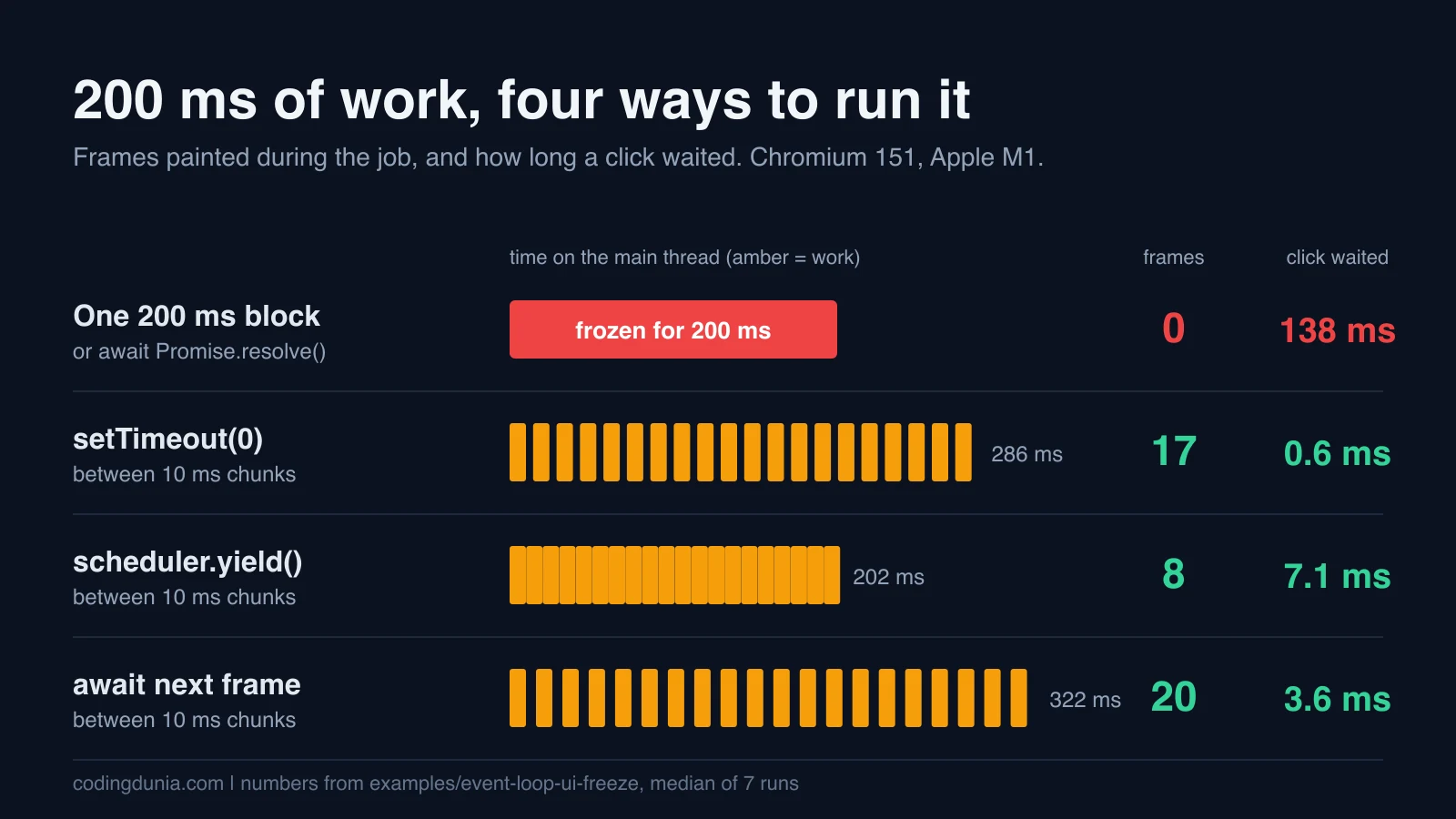
A freeze isn't one bug. It's two symptoms with one cause: your code kept the main thread for so long that the browser couldn't paint and couldn't hear the click. "Just add an await" is the usual advice, and one version of it does nothing at all.
I wrote a small harness to see which kinds of yield help. It runs 200 ms of busy work under six strategies in a real Chromium, counts the frames the browser painted during the job, and fires a click about 60 ms in. The whole thing is in the event-loop-ui-freeze example. It asserts every result below, so it fails if a future Chromium changes an answer.
The ordering rules of microtasks and timers are in the event loop guide. This article starts where that one stops: the rendering step, and what you can yield to.
Where does painting fit in the event loop?
Painting isn't a callback you can queue. According to the HTML Standard's processing model, the browser waits for a rendering opportunity and then queues a task on the rendering task source to "update the rendering". Inside that task it runs the requestAnimationFrame callbacks, recalculates style and layout, and marks paint timing. It also skips documents that are hidden. Whether to take a given opportunity is the browser's call.
So there are two separate things in your way. Your own task has to end before any other task starts. And the rendering task has to get its turn among the tasks that are waiting.
Here's what I measured about the queue. From inside a timer task I queued six things at once and logged the order they ran, thirty times:
| Callback | Position | Runs |
|---|---|---|
Promise.then, queueMicrotask | 1st, 2nd | 30 of 30 |
await scheduler.yield() continuation | 3rd | 30 of 30 |
setTimeout(fn, 0) | 4th | 30 of 30 |
MessageChannel message | 5th | 29 of 30 |
requestAnimationFrame | 6th | 29 of 30 |
In the thirtieth run the frame callback beat the message. It was a headless Chromium on one laptop, so treat the rAF position as "usually after", never "always". The first four rows didn't move, and they match the documentation. The microtasks run before anything else, and the scheduler.yield() continuation lands ahead of a zero-delay timer, which MDN says is by design: it's placed at the front of its priority level's queue.
How I measured a freeze
The harness is plain JavaScript. A busy(ms) function spins on performance.now(), standing in for any synchronous work. Three signals come out of each run:
- Frames: a
requestAnimationFrameloop counts how many frames the browser produced while the job ran. - Long animation frames: a
PerformanceObserverforlong-animation-frame, which MDN defines as a rendering update delayed beyond 50 ms. - Input delay: Playwright clicks a button about 60 ms into the job, and the listener records
performance.now() - event.timeStamponpointerdown.
The job is either one busy(200) or twenty busy(10) calls with a pause between them:
for (let i = 0; i < 20; i++) {
  busy(10)
  await pause[name]()
}
Setup: Playwright 1.62.1, Chromium 151.0.7922.34 headless, Node 22.23.3, an Apple M1 with 16 GB. Every number below is the median of seven fresh pages.
Six strategies, one table
| Strategy | Job took | Frames painted | Longest frame | Click waited |
|---|---|---|---|---|
| One 200 ms block | 200 ms | 0 | 201 ms | 138.1 ms |
await Promise.resolve() | 200 ms | 0 | 201 ms | 137.6 ms |
setTimeout(0) | 286 ms | 17 | none over 50 ms | 0.6 ms |
await scheduler.yield() | 202 ms | 8 | 71 ms | 7.1 ms |
| Wait for the next frame | 322 ms | 20 | none over 50 ms | 3.6 ms |
Next frame, then setTimeout(0) | 323 ms | 20 | none over 50 ms | 2.7 ms |
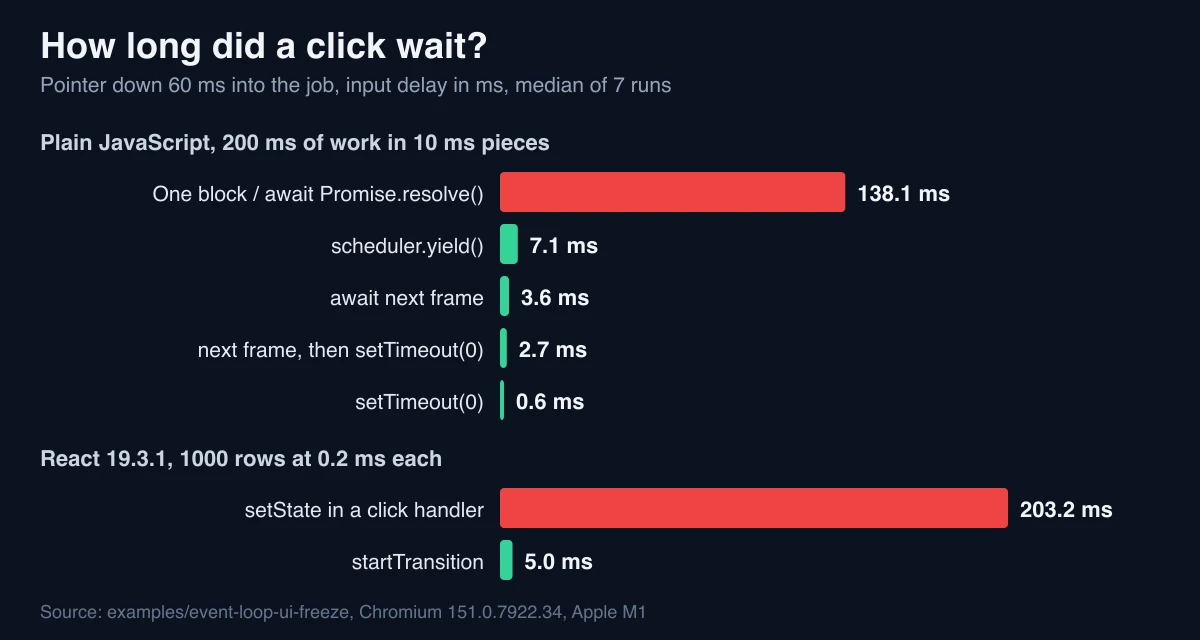
Run it twice and the second digit moves. Three runs on the same machine gave 276, 280 and 286 ms for the timer version. The shape never changed.
Why is await Promise.resolve() not a yield?
Because it never leaves the microtask queue. The browser has to drain that queue completely before it can run the rendering task or deliver a click, so twenty chunks separated by resolved promises are one 200 ms task wearing a costume. Zero frames, one long animation frame of 201 ms, and a 138 ms click delay that's indistinguishable from the plain block.
This is the mistake I'd bet on finding in a codebase that "already yields". It reads right and it measures wrong, and the only way to see it is to count frames.
What does setTimeout(0) cost?
A bit of time. The job stretched from 200 ms to 286 ms, so each pause cost about 4.3 ms. That's consistent with the clamp web.dev describes, nested timers being throttled after five levels, though I didn't isolate it. What you get for that: 17 frames across 286 ms, which is the full 60 Hz cadence, and the fastest click response of the lot at 0.6 ms.
The catch web.dev points out is the queue position. A timer task goes to the back of the line, so if other tasks are waiting, they run before your continuation. In this harness nothing else was waiting. On a busy page, that's where a chunked job gets slower than the numbers above.
Why does scheduler.yield() paint fewer frames?
It finished in 202 ms, about 84 ms sooner than the timer version, but only 8 frames got through, and one long animation frame of 71 ms appeared. The click still waited only 7.1 ms.
My reading, and it's a reading, not something I isolated: the continuation is boosted to the front of the queue, so after each chunk the job resumes before the browser's next rendering task gets its slot, except for the gaps where the browser takes the opportunity anyway. The result is a fast job with a few frames dropped. The MDN page describes the front-of-queue placement. It doesn't say anything about frame counts, so that part is my inference.
Support is the other half of the story. MDN's compatibility data, which I pulled on October 23, 2026, lists scheduler.yield() from Chrome 129 and Firefox 142 and not in Safari. Use it with a fallback:
function yieldToMain() {
  if (globalThis.scheduler?.yield) {
    return scheduler.yield()
  }
  return new Promise((resolve) => setTimeout(resolve, 0))
}
Long animation frames are narrower still. The same data has them in Chrome 123 and no Firefox or Safari support, so a PerformanceObserver for them needs a feature check before you rely on it.
When do you need a frame, not a task?
If the point of yielding is that the user must see something change before the next chunk starts, only waiting for a frame gives that guarantee. Awaiting a requestAnimationFrame painted a frame in each of 20 gaps. The price is 322 ms for work that takes 200, because each pause waits for the next 60 Hz slot.
const nextFrame = () => new Promise((resolve) => requestAnimationFrame(() => resolve()))Two cautions. A frame callback runs before paint, not after it, which is why the variant with a setTimeout inside the callback exists. In my run the two behaved the same, 20 frames each. And per the spec's rendering steps, a hidden document is skipped, so a job that awaits frames shouldn't be assumed to finish in a background tab. I didn't test that part.
Does startTransition fix this in React?
It fixes the part that React controls. I built a list of 1000 rows where each row spins for 0.2 ms while it renders, so rendering the list costs roughly the same 200 ms. One button calls setRows(1000) directly. Another wraps it in startTransition. A third button is the probe, and I clicked it about 60 ms after the first. React was 19.3.1, production build.
| Update | Committed after | Click waited |
|---|---|---|
setRows(1000) in the click handler | 255.8 ms | 203.2 ms |
startTransition(() => setRows(1000)) | 260.7 ms | 5.0 ms |
The work took the same time either way. What changed was whether the click had to stand in line. The React docs say a transition update "will be interrupted by other state updates", and this is what that looks like with a stopwatch: the probe click was handled in 5 ms in the middle of a 260 ms render.
My opinion: startTransition is the right default for a heavy render triggered by a click or a filter, and the wrong tool for the "work" itself. It doesn't make anything cheaper. If a row costs 0.2 ms, 1000 rows will cost 200 ms somewhere, and a slower phone just stretches the stretch.
The docs list limits worth knowing. Transition updates can't control a text input, so the input's own state stays a normal update. Only updates made synchronously inside the callback count, so a setState in a setTimeout isn't a transition. And after an await inside an async transition, the next update needs its own startTransition.
What none of these fix
All six strategies still run your work on the main thread. Chunking moves the cost around, and the sum stays 200 ms or more. If the work is CPU-bound and doesn't touch the DOM, a Web Worker is the actual cure, because per MDN it runs in a background thread and can't manipulate the DOM directly. The Node side of the same idea is in the worker threads guide.
For the user-visible number, web.dev rates Interaction to Next Paint at 200 ms or less as good, measured at the 75th percentile of real page loads. It splits an interaction into input delay, processing time and presentation delay. My table covers only the first part, and finding which interaction costs you is a separate job. A 138 ms delay before your handler even starts leaves about 60 ms of that 200 ms for everything else, and the React 19 Core Web Vitals guide covers measuring the rest in the field.
Would I yield after every chunk? No. web.dev suggests yielding by deadline for many small jobs, about 50 ms between yields, since a pause after each tiny unit adds overhead. That pattern wasn't part of my harness, so I won't put a number on it.
What I'd do about it
Awaiting a resolved promise between chunks painted zero frames in my run, exactly like one 200 ms block, while setTimeout(0) painted 17.
Three rules, all open to argument:
- Reject
await Promise.resolve()as a yield in code review. If it's meant to give the browser a turn, it doesn't. - Use
scheduler.yield()with the timer fallback for loops. Wait for a frame only when the user must see a state change before the next chunk. - In React, wrap the heavy render in
startTransition, keep text input state outside it, and move genuinely CPU-bound work to a worker.
What this doesn't prove
One machine, one browser, headless. Frame counts may depend on the refresh rate a headless browser simulates, and I ran no Firefox or Safari. The busy-wait is a stand-in: real work allocates, touches the DOM and triggers layout, which this doesn't. And a 10 ms chunk is my choice, so a different size would give different milliseconds. So take the ordering from this article, and take the milliseconds as one measurement from the harness.
If you want the same rule from a different angle, the async/await guide has the microtask tick counts, and the React 19.3 ViewTransition article shows another place where a transition changes what the browser does.
Which of your own "yields" would survive a frame count?