
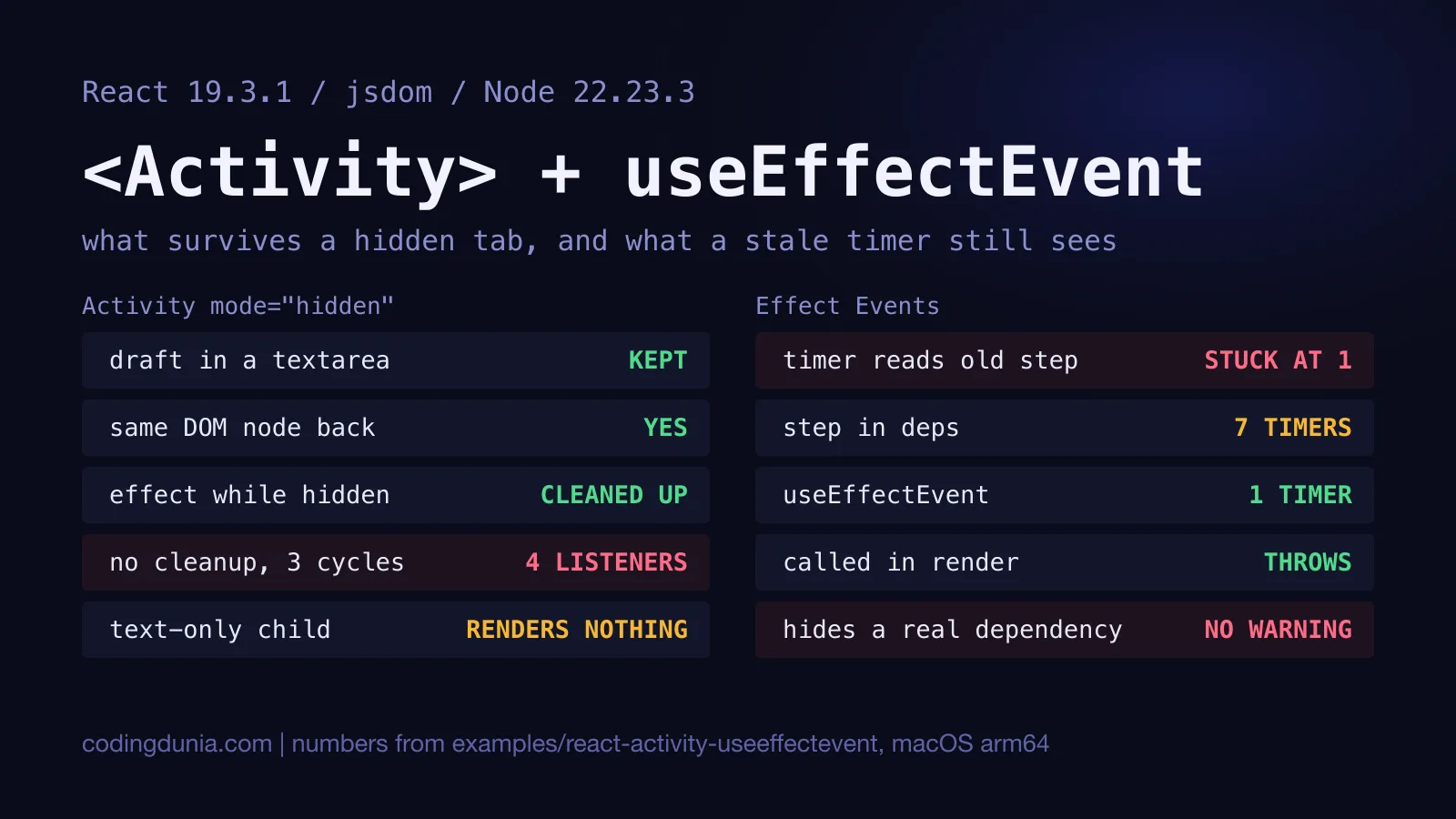
Hide a tab and its effects should stop. Read a prop inside a timer and it shouldn't be a week old. Those are the two jobs of <Activity> and useEffectEvent, and both reference pages are short enough that the sharp edges hide between the lines.
React 19.2 shipped both on October 1, 2025, according to the release post. I ran everything below on react and react-dom 19.3.1, the current latest on npm (published October 14, 2026), in jsdom 30.1.3 on Node 22.23.3 and an Apple M1. It's the development build, since that's where React complains. jsdom is not a browser, so there's no layout, no paint and no media pipeline. I stubbed play() and pause() on media elements to flip a flag, and I'll say where that matters. The full harness is in the repo.
TL;DR:
<Activity mode="hidden">keeps state and DOM but runs every effect cleanup, so each effect needs one. Hidden content still renders, at low priority, anduse()data loads ahead of time while effect fetches wait.useEffectEventfixes stale timers with one interval, React throws only if you call it in render, and the linter can't tell when it hides a dependency you needed.
What Does Activity Keep When a Tab Hides?
State, and the DOM it produced. That's the whole pitch, and it held.
import { Activity } from 'react';

type Tab = 'draft' | 'other';

function Tabs({ tab }: { tab: Tab }) {
  return (
    <>
      <Activity mode={tab === 'draft' ? 'visible' : 'hidden'}>
        <Draft />
      </Activity>
      <p>{tab}</p>
    </>
  );
}
Draft holds a counter, a controlled input and an uncontrolled <textarea>. I clicked the counter twice, typed into both fields, switched to the other tab and came back. Then I ran the same thing with {tab === 'draft' && <Draft />}.
| After switching away and back | Conditional render | <Activity> |
|---|---|---|
| Counter, clicked twice | 0 | 2 |
| Controlled input | empty | Hello |
| Uncontrolled textarea | empty | half-written note |
| Same textarea DOM node | no | yes |
| Effect log | setup, cleanup, setup | setup, cleanup, setup |
Read the last row twice. The effect log is identical. The draft isn't. So an Activity is a component whose effects behave as if it were unmounted and whose state and DOM behave as if it weren't. While hidden, the textarea stayed in the document under a display: none wrapper, which matches the Activity reference. The docs also say mode defaults to 'visible' and that only the two modes exist today. I didn't test the default.
What Happens to Effects While a Tree Is Hidden?
They're cleaned up, and that turns a sloppy effect into a leak.
The reference page tells you to think of hidden Activities as unmounted. I wanted to see what that costs, so I put a panel in an Activity, had its effect add a listener to a shared set, and toggled hidden and visible three times. One panel returned a cleanup. The other didn't.
listeners, withCleanup     mounted 1, hidden 0, visible 1, hidden 0, visible 1, hidden 0, visible 1
listeners, withoutCleanup  mounted 1, hidden 1, visible 2, hidden 2, visible 3, hidden 3, visible 4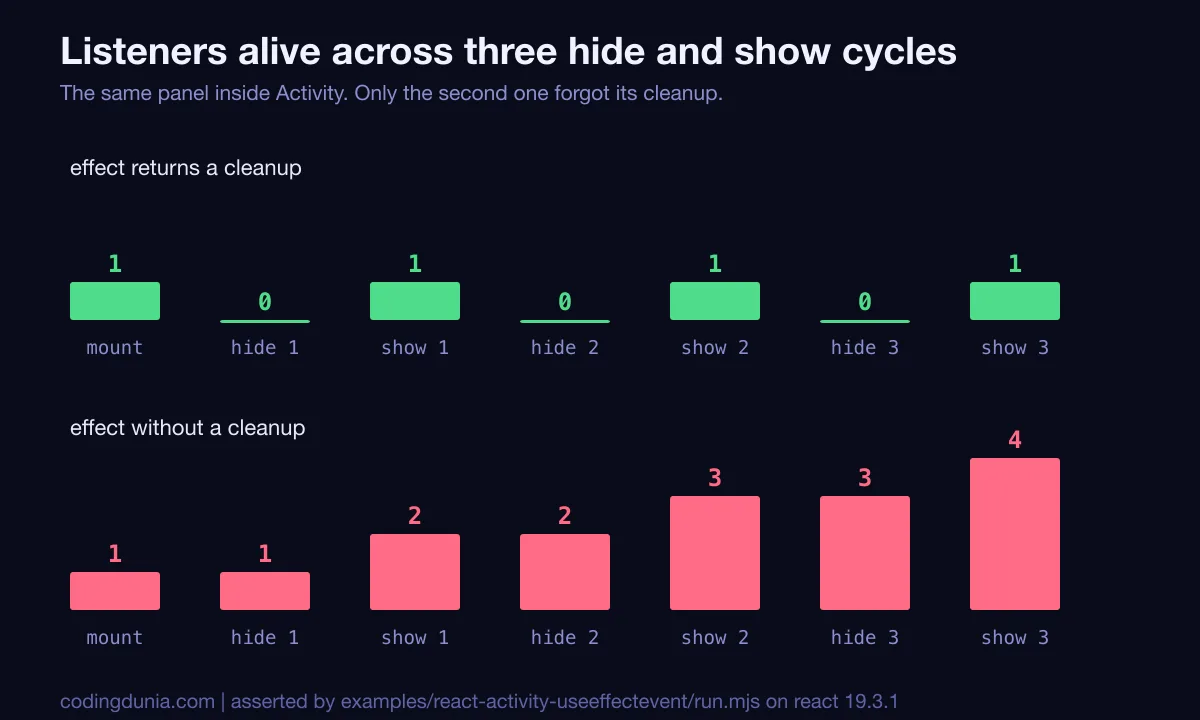
Four listeners after three tab switches. Before Activity, a missing cleanup showed up as a doubled effect under StrictMode (my leaky effect left 2 listeners after a single mount there) and as a leak only when a component unmounted. Now it shows up every time someone clicks a tab. That's a real change in what "forgot the cleanup" costs.
DOM side effects are the second trap. React doesn't destroy a hidden tree's DOM, so a <video> keeps playing. The reference says to add a cleanup that pauses it, and to use useLayoutEffect because a regular effect "could be delayed" by a re-suspending boundary or a view transition. In my stubbed run the flag stayed yes after hiding with no cleanup and went to no with a useLayoutEffect cleanup that calls pause(). A stub proves React ran my cleanup. It doesn't prove a browser stops the sound, so check that in a real one. The same goes for <audio> and <iframe>, which the docs name.
Does Hidden Content Render Before You Show It?
Yes, once. It renders at low priority, and then waits.
I mounted an Activity as hidden from the start. The render log said render and nothing else, the DOM was there with display: none, and no effect had run. When I flipped it visible, the log read render, effect setup. So pre-rendering is real, and effects mount only when the tab does.
What you can prefetch depends on how you fetch. I put two components in hidden Activities. One read a cached promise with use() inside a Suspense boundary. The other fetched in an effect.
while hidden   use() fetches 1, effect fetches 0, use() list items in hidden DOM 2, effect list items 0
after show     use() fetches 1, effect fetches 1, both lists 2 items
That matches the reference: only data read from a source that activates Suspense is fetched during pre-rendering, and Activity can't see a fetch inside an effect. If you want a tab ready before the click, the use() deep dive covers the cached-promise rule the first component followed.
Two quirks from the docs reproduced as well. A hidden Activity whose child returns only a string renders nothing, because there's no element to hide, so wrap text in a <span>:
text, visible   Hello, World!
text, hidden    (empty)
span, hidden    <span style="display: none !important;">Hello, World!</span>
And renderToString on React 19.3.1 left a hidden Activity out of the server HTML entirely, while the visible sibling came through with comment markers around it. I'd read that as "don't park text you need indexed inside a hidden Activity", though I only checked the server string, not what a crawler does with the hydrated page.
When Does useEffectEvent Beat Dependencies and Refs?
When an effect must keep running but needs today's value. A timer is the clearest case.
The harness has a counter that adds step on every tick, driven by a fake setInterval so ticks are counted, not waited for. Three ticks at step 1, then the parent sets step to 10, then two more ticks. The right answer is 23.
const onTick = useEffectEvent(() => setCount(count + step));

useEffect(() => {
  const id = setInterval(() => onTick(), 1000);
  return () => clearInterval(id);
}, []);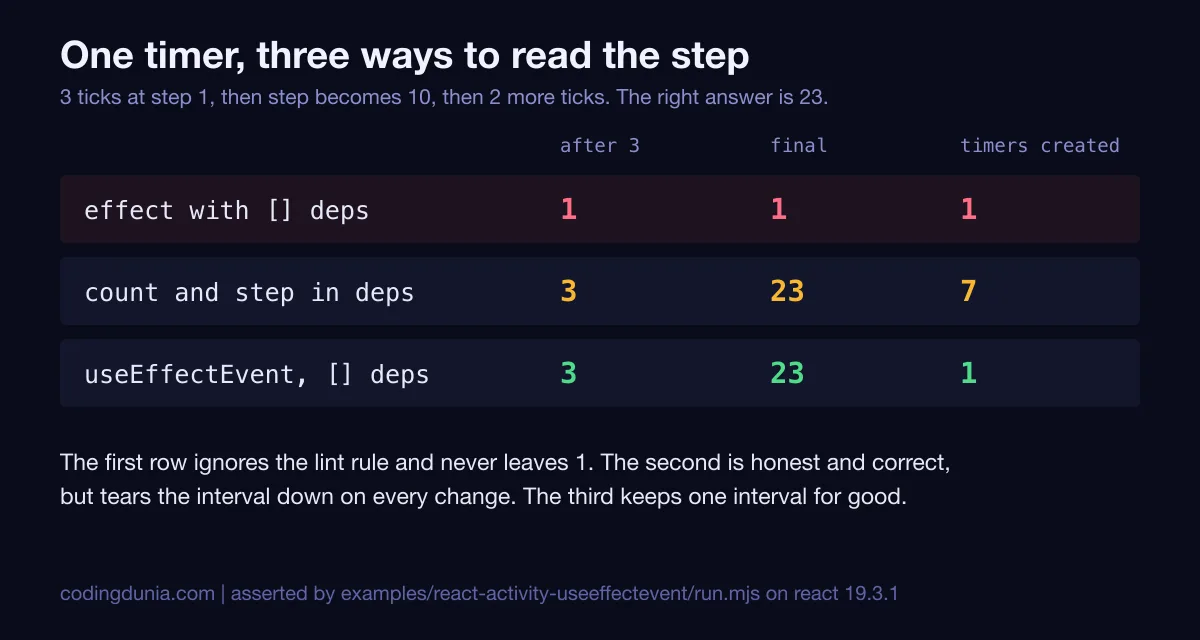
An effect with [] and the values written inline stayed at 1 forever, because every tick closed over count of 0. Listing count and step gave the right answer, but the interval was created 7 times and cleared 6, once per change. The Effect Event version reached 23 with a single interval for the component's whole life.
Is that always the right trade? The Separating Events from Effects page says no: use it "only" on the lines you don't want to be reactive. A refs-based version also works, and the hooks best-practices guide compares the three. The difference is that the Effect Event is checked by the linter and a hand-rolled ref isn't.
What Does React Enforce, and What Does Only the Linter?
Less than the docs make it sound. I tested each rule from the reference page at runtime.
| What I did | React 19.3.1 at runtime |
|---|---|
| Called an Effect Event during render | threw: "A function wrapped in useEffectEvent can't be called during rendering." |
| Called it from a click handler | worked, 1 call, 0 console errors |
| Passed it to a child that called it in an effect | worked, child saw the latest value, 0 console errors |
| Compared identity across 3 renders | a new function every render |
I went looking for a warning on the handler case and found none. The guard for those two lives in eslint-plugin-react-hooks. I ran version 7.1.1 under ESLint 10.13.0 (the release post says to upgrade to the latest plugin and points at 6.1.0 in its changelog, and I didn't test anything older). It reported the dependency-array mistake under exhaustive-deps, and it reported the handler, the child and the render-time call under rules-of-hooks, each naming the Effect Event.
The case it missed is the one the docs call an anti-pattern. An effect logs a page visit and calls an Effect Event that reads pageUrl, with [] as its dependencies. Go from /a/ to /b/ and the log held ['/a/']. With [pageUrl] it held ['/a/', '/b/']. The linter printed no message for the first version. Delete the Effect Event and read pageUrl directly, and the same linter says "missing dependency: 'pageUrl'".
useEffectEvent doesn't remove a dependency, it moves the decision from the linter to you, and the linter can't see the decision.
That's why I'd flag every new useEffectEvent in review and ask one question: should this effect restart when that value changes? If yes, it belongs in the array. If it's a notification, a log line or a read of "the latest whatever" at the moment something happens, it belongs in an event. You can disagree with making it a review rule, and for a small team a convention might be enough. The data says the tooling won't catch it for you.
What Happens When You Combine Them?
The timer stops while hidden, the count survives, and the new step applies on return.
I wrapped the ticking counter in an Activity and walked it through two ticks, a hide, a tick while hidden, a step change from 1 to 10 and a show.
visible after two ticks   count 2, live timers 1
hidden                    count 2, live timers 0
tick while hidden         count 2
shown again               count 2, live timers 1
one tick at step 10       count 12
timers created 2, cleared 1
Hiding cleared the interval, so the tick I fired had nothing to run. Showing created a new one, and the Effect Event read step 10 on the first tick, even though the step changed while the tab was away. That's the pairing I'd reach for in a hidden dashboard tab with a poller: Activity stops the work, and the Effect Event keeps the work honest when it restarts.
Should You Wrap Everything in Activity?
No, and I'd say that even though it's tempting. A hidden tree keeps its DOM and its state in memory and re-renders at low priority when its props change. I didn't measure memory or render cost in a browser, so I can't give you a number, only the mechanism the docs describe. My rule: use it where losing the state would annoy a user, like a half-written form in a tab, and leave plain conditional rendering everywhere else. Also add a cleanup to every effect in any subtree you put inside one, because StrictMode will now simulate the hide and show cycle during development, per the docs.
Two things I did not test: how the Activity docs' Selective Hydration claim plays out in a real browser, and the ViewTransition enter and exit behaviour the reference describes. For the second, the 19.3 ViewTransition measurements are the closest thing here.
Run It Yourself
cd blogs/coding-dunia/examples/react-activity-useeffectevent
npm install
npm test    # needs Node 22.22.2 or newer (jsdom 30)
run.mjs asserts every number above, so it fails if a future React changes an answer. lint.mjs runs ESLint against seven small cases and asserts what the plugin reports. I ran both on Node 22.23.3 and 24.21.0, and each time passed. Pinned: react and react-dom 19.3.1, eslint-plugin-react-hooks 7.1.1, eslint 10.13.0, jsdom 30.1.3.
If You're Also Dealing With...
- The wider 19.x feature list and migration notes: the React 19 complete guide.
- The same linter plugin, and its compiler-powered rules: the React Compiler practical guide.
- A subscription that must survive a reconnect: the real-time WebSocket dashboard keeps its socket outside the tree for exactly that reason.
- Suspense boundaries around data you'd like loaded early: the Suspense data fetching patterns.