
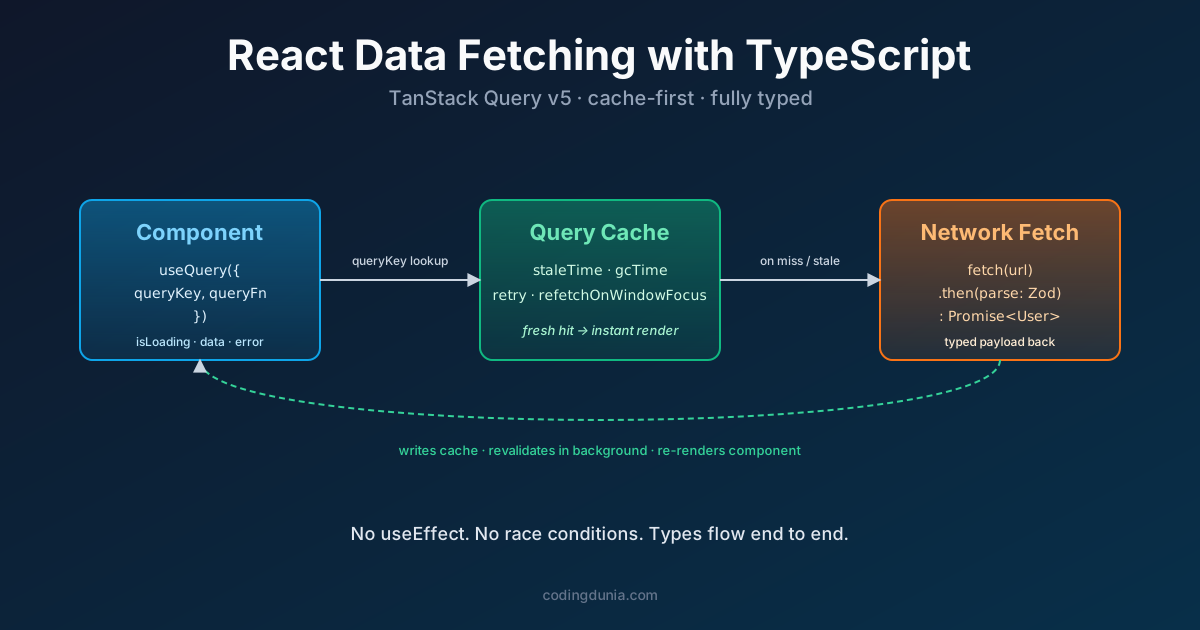
TanStack Query is a data-fetching and caching library for React that replaces manual useEffect fetch logic with type-safe hooks like useQuery and useMutation, handling caching, background refetching, and error state automatically. Every React developer eventually writes the same buggy useEffect fetch block. It shows up in codebase after codebase, the same shape every time. The async cleanup, the stale closure, the missing loading state, it all adds up. Then TanStack Query exists and none of that is your problem anymore.
Stale-while-revalidate is a caching strategy, and the core model behind TanStack Query, where a component gets the cached value immediately while a background request checks if the data has changed, updating the UI only if the fresh response actually differs. Query key is the array TanStack Query uses to identify, cache, and invalidate a specific piece of server state, such as ['users', userId], and it's the mechanism the library watches to know when to automatically refetch.
Quick take: TanStack Query v5 (released 2024, now at 5.102.8 as of September 2026) ships first-class TypeScript generics, automatic caching, and background refetching. It has over 42 million weekly npm downloads (npm stats, 2026). Define your types once, pass them to
useQuery, and you get fully type-safe server state in every component. The library officially supports any TypeScript version released within the last two years, and its only declared peer dependency is React 18 or 19, so the TypeScript side is yours to choose. The examples here were written against React 19.Key takeaways:
useEffect + fetchintroduces race conditions you don't see until production- TanStack Query v5 generics infer return types from
queryFnautomatically- Mutations follow the same generic pattern:
useMutation<Response, Error, Variables>()- Strong types make AI code completion (Copilot, Claude Code) dramatically more accurate
If you want a deeper reference on the library itself, options, devtools, plugins, and version history, our TanStack Query catalog entry covers the API surface; for the hooks side of the integration, React hooks best practices walks through the rules that useQuery is built on.
Why Is useEffect + fetch the Wrong Approach?
useEffect for data fetching is not a React anti-pattern because people are lazy. It's a problem because the browser doesn't know you sent a request, and React doesn't help you manage it. A 2023 React core team post on react.dev explicitly recommends a data-fetching library over raw useEffect for production apps. (React 19 Documentation, 2024)
Here's the core issue. Two rapid renders both fire a fetch. The second response arrives first. The first response lands later and overwrites a fresher result. You now display stale data. This is a race condition, and it's invisible in development where network calls resolve in milliseconds.
The other problems pile up fast:
- No caching, every mount re-fetches even if the data is seconds old
- No deduplication, two components requesting the same URL fire two separate HTTP calls
- No background refetch, data goes stale and there's no built-in way to refresh it
- Manual cleanup, forget the
isMountedflag and you get a state update on an unmounted component
All four of these bugs ship to production constantly. The fix isn't discipline, it's the right tool.
Here's how to check whether a component in your codebase has this problem:
- Search for
useEffectcalls that contain afetchoraxioscall inside them. Each one is a candidate. - Check if there's an
isMountedflag or a cleanup function guarding the state update. If not, it's a memory-leak risk on unmount. - Check if the same endpoint is called from more than one component. If so, you're very likely making duplicate network requests today.
- Check if there's any cache invalidation logic at all. If the answer is no, every remount refetches from scratch, even for data that's seconds old.
If you're still wiring useEffect and useState for server data, you're hand-rolling a worse version of a cache TanStack Query already solved.
The Evolution of React Data Fetching
| Approach | Year | Caching | TypeScript | Race-safe | Background refresh |
|---|---|---|---|---|---|
fetch + useEffect | 2015 | No | Manual | No | No |
Axios + useEffect | 2016 | No | Manual | No | No |
| React Query v3 | 2021 | Yes | Partial | Yes | Yes |
| TanStack Query v5 | 2024 | Yes | First-class | Yes | Yes |
TanStack Query v5 didn't just add features, it rewrote the TypeScript generics from scratch. The v4 API had a few rough edges where the inferred type fell back to unknown. That's gone in v5.
The diagram shows the read path. Mutations follow a separate flow that we'll cover in the mutations section below.

How Do You Define Your Data Types?
Good types are the foundation. Everything downstream, your fetcher, your query, your component, inherits correctness from the interfaces you write here. In production code, define types in a dedicated types/ folder rather than colocating them with components. It makes them reusable across queries and mutations.
// types/user.ts
export interface User {
  id: number;
  name: string;
  email: string;
  role: 'admin' | 'editor' | 'viewer';
  createdAt: string; // ISO 8601
}

export interface ApiError {
  message: string;
  code: number;
  field?: string;
}
Want runtime safety on top of compile-time safety? Add a Zod schema, or generate it from your interface and tidy the result.
// types/user.schema.ts
import { z } from 'zod';

export const UserSchema = z.object({
  id: z.number(),
  name: z.string(),
  email: z.string().email(),
  role: z.enum(['admin', 'editor', 'viewer']),
  createdAt: z.string(),
});

export type User = z.infer<typeof UserSchema>;
Zod adds about 12kb gzipped to your bundle. For apps hitting internal APIs you control, I'd skip it. For third-party APIs that occasionally send malformed responses, it pays for itself the first time a bad payload hits staging.
How Do You Write a Type-Safe Fetcher Function?
Your fetcher is just an async function that returns typed data. Keep it separate from the query config. This makes it testable and reusable across multiple queries.
// api/users.ts
import axios, { AxiosError } from 'axios';
import type { User } from '../types/user';

const BASE_URL = import.meta.env.VITE_API_URL ?? 'https://api.example.com';

export async function fetchUsers(): Promise<User[]> {
  const { data } = await axios.get<User[]>(`${BASE_URL}/users`);
  return data;
}

export async function fetchUserById(id: number): Promise<User> {
  const { data } = await axios.get<User>(`${BASE_URL}/users/${id}`);
  return data;
}
Why Axios here and not native fetch? Axios gives you automatic JSON parsing and response interceptors. My rule of thumb: if the project already has Axios in package.json, use it. If it doesn't, native fetch works fine for simple GETs, just remember to await res.json() and handle non-2xx status codes manually.
How Do You Use useQuery with Full TypeScript?
Here's the complete pattern. Pass your data type and error type as generics. TanStack Query v5 infers the return type of queryFn automatically, so you get full autocomplete on data without any casting. (TanStack Query v5 Docs, 2024)
// components/UserList.tsx
import { useQuery } from '@tanstack/react-query';
import type { AxiosError } from 'axios';
import { fetchUsers } from '../api/users';
import type { User, ApiError } from '../types/user';

export function UserList() {
  const {
    data: users,
    isLoading,
    isError,
    error,
  } = useQuery<User[], AxiosError<ApiError>>({
    queryKey: ['users'],
    queryFn: fetchUsers,
    staleTime: 1000 * 60 * 5, // 5 minutes
  });

  if (isLoading) return <p>Loading users...</p>;
  if (isError) return <p>Error: {error.response?.data.message ?? error.message}</p>;

  return (
    <ul>
      {users.map((user) => (
        <li key={user.id}>
          {user.name}, {user.role}
        </li>
      ))}
    </ul>
  );
}
Notice staleTime. Setting it to 5 minutes means TanStack Query won't refetch the user list on every component mount, it returns the cached version instead. This is the default behaviour that useEffect can never give you for free.
What about dynamic query keys? Use an array with the variable inside it. TanStack Query watches the key and refetches when it changes, no useEffect dependency array to forget.
const { data: user } = useQuery<User, AxiosError<ApiError>>({
  queryKey: ['users', userId],
  queryFn: () => fetchUserById(userId),
  enabled: Boolean(userId), // don't fetch if userId is undefined
});
The enabled flag is underused. It solves the common pattern of "wait for one query to finish before starting another" without any callback chaining. Pass enabled: Boolean(data?.userId) and the dependent query simply won't run until the first one resolves.
For more on query-key conventions, hierarchical invalidation, and the cache-time vs stale-time mental model, see the TanStack Query reference, it covers the patterns this guide doesn't repeat.

How Do You Handle Mutations with Optimistic Updates?
useMutation follows the same generic pattern. Three type parameters: the response type, the error type, and the variables type you pass to mutate().
// components/CreateUserForm.tsx
import { useMutation, useQueryClient } from '@tanstack/react-query';
import axios, { AxiosError } from 'axios';
import type { User, ApiError } from '../types/user';

interface CreateUserVars {
  name: string;
  email: string;
  role: User['role'];
}

async function createUser(vars: CreateUserVars): Promise<User> {
  const { data } = await axios.post<User>('/users', vars);
  return data;
}

export function CreateUserForm() {
  const queryClient = useQueryClient();

  const { mutate, isPending, isError, error } = useMutation<
    User,
    AxiosError<ApiError>,
    CreateUserVars
  >({
    mutationFn: createUser,
    onSuccess: (newUser) => {
      // Optimistic: add new user to the cache immediately
      queryClient.setQueryData<User[]>(['users'], (prev = []) => [
        ...prev,
        newUser,
      ]);
    },
    onError: () => {
      // Rollback: invalidate and let a fresh fetch restore correct state
      queryClient.invalidateQueries({ queryKey: ['users'] });
    },
  });

  return (
    <button
      disabled={isPending}
      onClick={() => mutate({ name: 'Jane Doe', email: 'jane@example.com', role: 'editor' })}
    >
      {isPending ? 'Creating...' : 'Create user'}
    </button>
  );
}
The onSuccess + onError pair is the optimistic update pattern. Update the cache immediately on success, invalidate on error. Users see instant feedback. If the server rejects the request, the list snaps back to truth. Clean and honest.
How Good TypeScript Types Improve AI Code Suggestions
Run the same prompt through GitHub Copilot on a React codebase with strict TypeScript interfaces and on one that uses any everywhere. The difference in suggestion quality is immediate, with proper types, Copilot completes useQuery calls with correct generic parameters and accurate property names on the first attempt. With any, it guesses wrong on the response shape half the time.
This matters more than ever in 2026. Tools like Copilot and Claude Code read your type definitions when generating completions. A well-typed User interface tells the model exactly which fields exist, what types they are, and what operations make sense. An any type tells it nothing, you get generic boilerplate at best, subtly broken code at worst.
The TanStack Query generics amplify this effect. When your useQuery is typed as useQuery<User[], AxiosError>, your IDE and your AI assistant both know that data is User[] | undefined. They won't suggest data.id on a list. They'll suggest data?.map(...) instead.
The investment pays off fast. Write the types once. Every query, every mutation, every AI suggestion downstream benefits.
React Data Fetching with TypeScript and TanStack Query is one of those combinations where the pieces genuinely reinforce each other. TanStack Query solves the state management problems. TypeScript generics catch the shape mismatches. Together they make the kind of data layer that's easy to extend and hard to break accidentally.
The next step is setting up a QueryClient with global defaultOptions for retry logic and error boundaries, but that's a separate guide. For now, wire up your first useQuery, add the types, and notice how much cleaner the component tree becomes.
Want more on this? Subscribe to the Coding Dunia newsletter, one practical React or TypeScript tip, weekly, no filler.
For TypeScript patterns that keep your data layer clean and maintainable, including discriminated unions for loading states and mapped types for keeping API schemas in sync, the TypeScript clean code guide covers 15 of them with before-and-after examples.
Related Tutorials
- Suspense for data fetching - the pattern TanStack Query hands off to once you let Suspense own the loading state
- Claude Code for React
- React 19 guide
- React Compiler: Practical Guide to Auto-Memoization
- React Hook Form vs Formik