
Run this yourself. Every number in this article came from
react-icon-bundle-cost/in the Coding Dunia examples repository.npm install && npm run benchrebuilds the full table in about two minutes.
Icons are the one dependency everybody adds without a second thought. A menu needs a chevron, a button needs a trash can, and a package that "tree-shakes" is assumed to cost nothing. I'd believed that for years, and our own Lucide React page even said each icon adds about 1 kB. That turns out to be wrong by a factor of ten.
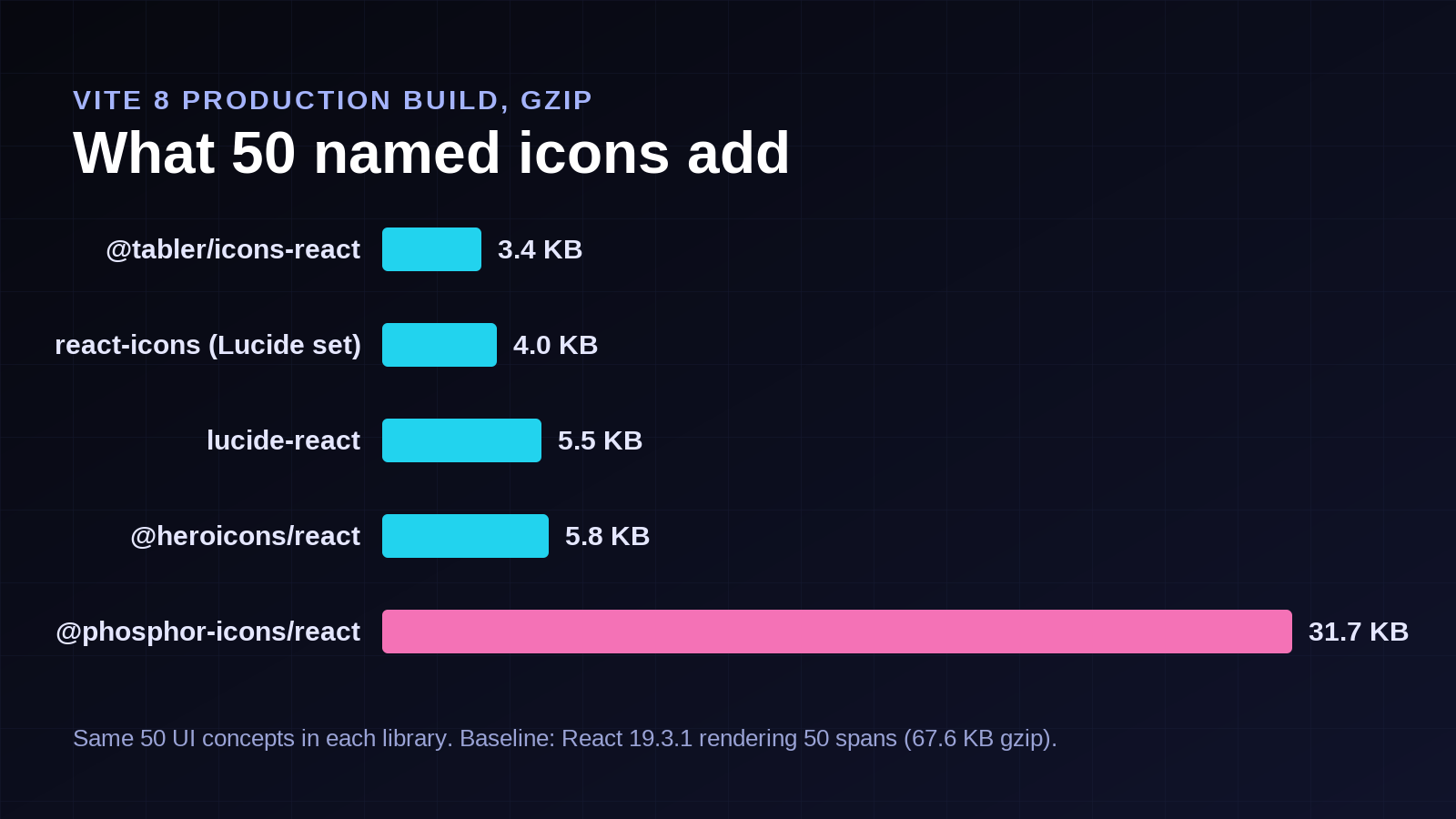
So I measured it. Same 50 interface concepts, five libraries, one Vite 8 production build.
How Did I Measure the Cost of an Icon?
I picked 50 everyday concepts: home, search, settings, user, bell, mail, calendar and so on up to refresh and save. For each library I looked up the name it uses for that concept, then wrote a small React app that imports exactly the first 1, 10 or 50 of them and renders them. A script builds each app with Vite 8.3.8 and adds up the gzip size (level 9) of every JavaScript file in the output.
The number in the tables is a difference. A baseline app renders the same count of plain <span> elements and ships 67,590 bytes of gzip JavaScript (React 19.3.1 and react-dom), so everything above that line belongs to the icons. Every cell was built three times, and the script stops if the size differs between rounds. It never did.
Versions: lucide-react 1.77.0, react-icons 5.7.0 using its Lucide set, @tabler/icons-react 3.52.0, @phosphor-icons/react 2.1.10, @heroicons/react 2.2.0 from 24/outline. Node 22.23.5 on an M1.
What Do 1, 10 and 50 Named Icons Cost?
| Library | 1 icon | 10 icons | 50 icons |
|---|---|---|---|
| @tabler/icons-react | 395 B | 1,185 B | 3,438 B |
| react-icons (Lucide set) | 1,217 B | 2,093 B | 3,983 B |
| lucide-react | 1,458 B | 2,560 B | 5,545 B |
| @heroicons/react (outline) | 545 B | 2,236 B | 5,805 B |
| @phosphor-icons/react | 1,176 B | 10,434 B | 31,677 B |
All values are gzip bytes added on top of the 67,590-byte baseline. Four of the five sit within 2.4 KB of each other at 50 icons. Is that a difference worth choosing a library for? No. Two kilobytes won't show up in any performance report you'll read.
Phosphor is the outlier, and it's the only one where I'd pause.
Why Is the First Icon So Much Dearer Than the Next Forty-Nine?
Look at lucide-react: 1,458 bytes for one icon, 5,545 for fifty. Divide the extra 4,087 bytes by 49 and a further icon costs about 83 bytes. The first one is expensive because it drags in the wrapper component that builds the SVG element, and every later icon reuses it.
The marginal cost per extra icon, after the first, works out like this:
| Library | First icon | Each extra icon |
|---|---|---|
| @tabler/icons-react | 395 B | 62 B |
| react-icons (Lucide set) | 1,217 B | 56 B |
| lucide-react | 1,458 B | 83 B |
| @heroicons/react (outline) | 545 B | 107 B |
| @phosphor-icons/react | 1,176 B | 622 B |
So "about 1 kB per icon" was a good description of the first icon and a poor one of the other forty-nine. I've corrected the Lucide and react-icons pages to say so.
Why Does Phosphor Cost Ten Times More Per Icon?
I didn't take this on trust, because ten times is a lot. Phosphor ships each icon as a component plus a definition file, and the definition holds every weight the set offers. I opened the House definition in 2.1.10: it contains thin, light, regular, bold, fill and duotone, 2,662 bytes before compression. Render one weight and you still ship six.
That's a design decision, not a bug, and it's what lets you switch weight with a prop. If you use three icons in one weight, you'll never notice. If you build a toolbar of fifty, you've bought roughly 26 KB more than lucide-react would cost, most of it weights nobody sees. In my opinion Phosphor is a fine choice for a small, hand-picked set and a poor default for a design system with a big icon vocabulary.
Does Importing From the Barrel File Bloat a Production Build?
I expected it to, at least for react-icons, whose root package has a reputation. It didn't. All five libraries tree-shook named imports from the package root in Vite 8, and react-icons added fewer bytes at 50 icons than lucide-react did. If you'd read that a barrel import "can bloat" the bundle, that advice describes older bundler setups and dev servers, not a current production build.
I didn't measure the dev server. Vite pre-bundles dependencies there, and first-load behaviour can differ from a build, so treat the table as production only.
One detail turned up while I was matching names. react-icons 5.7.0 still ships the older Lucide name LuFilter, while lucide-react 1.77.0 has Funnel for the same glyph. If you move between the two packages, expect a few renames.
What Happens When You Look Icons Up by Name?
This is where the numbers change by two orders of magnitude. I built a second app per library that imports the whole module and looks up the same 50 icons from a list of strings, the way a menu driven by a CMS or an icon picker works:
| Library | 50 icons by name | Named imports (50) |
|---|---|---|
| @heroicons/react (outline) | 33,124 B | 5,805 B |
| react-icons (Lucide set) | 77,481 B | 3,983 B |
| lucide-react | 212,235 B | 5,545 B |
| @tabler/icons-react | 513,551 B | 3,438 B |
| @phosphor-icons/react | 1,049,588 B | 31,677 B |
A bundler can't know which strings you'll look up at runtime, so it keeps every icon. Tabler goes from 3.4 KB to 514 KB, a factor of 150, and Phosphor passes a megabyte of gzip. The cheapest way out is the boring one: write the imports, or keep a small object that maps the handful of names you really use to components.
Which Library Should You Pick for Bundle Size?
Choose by design, then check the one trap. For a fixed set of icons, Tabler, react-icons, lucide-react and Heroicons are within a rounding error of each other, so pick the one whose drawings you like. If you'll use shadcn/ui, Lucide is already the default, and adding a second set would cost more than any of these differences.
Two rules do the real work. Never import * as Icons in code that ships to the browser unless the names truly come from data. And put a size budget on the entry chunk, as in this size-limit setup, so a name lookup added in a pull request fails the check instead of reaching production. If your build tool matters here, the Vite, webpack and esbuild comparison covers what each does with unused exports.
What Did This Not Measure?
Not much of the run is in doubt, but some things sit outside it. I measured production builds only, so dev-server cost isn't in the table. I measured bytes, not render time, and I didn't test lazy-loading routes such as lucide-react/dynamic. The 50 icons are everyday interface glyphs; a set of complicated illustrations would cost more per icon in every library. And these are one set of versions on one day, which is why the folder pins them and fails when a name disappears.
Which Guides Should You Read Next?
The react-icons page lists its icon packs and install options. For props and accessibility, the Lucide page linked at the top has the reference, and the size-limit guide linked above is the place to start if bundle budgets matter in your app.