
Every npm run build hands your user account to a few hundred packages you never read. They can read ~/.ssh, your .env files and your browser profile, because nothing in a default Node process says they can't.
Node ships a switch for that. It's called the permission model, it's stable since 22.13, and almost nobody turns it on for build steps. I wanted to know why, so I built a fake bundler plugin that does its job and also snoops, then ran it under --permission on three Node versions. The full harness is in the repo, and npm test there asserts every result below. The basics of the flag are in the Node 24 features guide. This piece is about the part that guide only touches: where the model holds, and where it quietly doesn't.
What Does --permission Block in a Build Script?
Everything outside a short list of grants. The fixture is a four-file static-site build: it reads src/*.css, runs it through a vendored plugin and writes dist/app.css. The plugin also tries to read a fake key at $HOME/.ssh/id_ed25519 and list the home folder. The script in package.json is the whole adoption cost:
{
  "scripts": {
    "build:open": "node scripts/build.mjs",
    "build:locked": "node --permission --allow-fs-read=. --allow-fs-write=dist scripts/build.mjs"
  }
}
I ran both through npm run with a throwaway HOME holding a canary key. The plugin wrote its own report into dist/, and this is what it saw:
open   {"readSshKey":"ok CANARY-SSH-KEY","listHome":"ok .env,.npm,.ssh"}
locked {"readSshKey":"denied FileSystemRead","listHome":"denied FileSystemRead"}
The locked build still exited 0 and still produced app.css. That's the part I like. The plugin did its advertised job, and the extra reach it shouldn't have had simply wasn't there. The error carries a permission field (FileSystemRead, FileSystemWrite, ChildProcess, WorkerThreads), so a failure tells you which grant is missing.
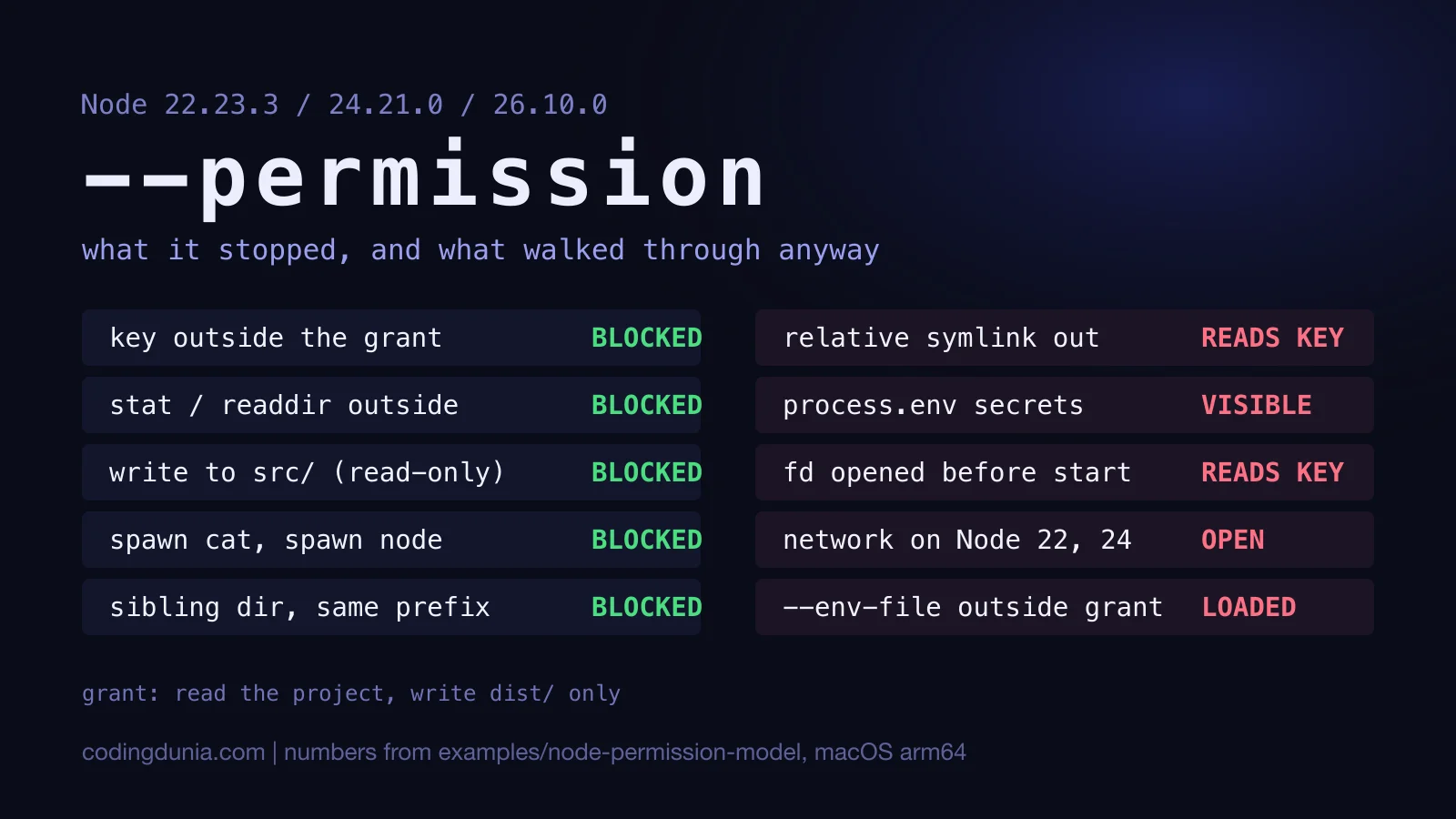
Under the same grants, the probe script I use for everything in this article was denied the key, stat and readdir outside the project, a write into src/, spawn of both cat and a second node, and a worker thread. A sibling folder that merely shares a name prefix (proj-secret next to proj) was denied too.
How Do You Write Grants That Don't Break the Build?
Small and boring. A few rules fell out of the runs.
Your entry script is allowed automatically, so --allow-fs-read only needs the project itself. Relative paths resolve against the working directory, which is why --allow-fs-read=. and --allow-fs-write=dist worked inside an npm script on all three versions. If a directory exists at startup, Node grants everything under it. If dist/ doesn't exist yet, the docs say no wildcard is added, so create it first or write the grant as dist/*.
Then there's the trap I'd flag to anyone copying a snippet. A trailing * is a string prefix, not a folder boundary. I granted --allow-fs-read="$PROJ*" and the probe read proj-secret/s.txt without an error. Leave the star off and let Node add its own.
How much of a real toolchain survives this? I tried one tool by hand and didn't put it in the harness. esbuild 0.28.2, asked to transform one line of TypeScript with only --allow-fs-read set, failed on all three versions with ERR_ACCESS_DENIED, permission ChildProcess. It runs a native binary as a child process. It worked again once I added --allow-child-process, and that flag is the next section's problem.
Where Does the Model Leak?
Seven places, and most of them need no extra flag at all.
- Relative symlinks. A link inside the project pointing at
../../home/.sshwas followed, and the key came back. The docs list this as a known issue. Absolute links did the same in my first probe, before I trimmed the harness. - Environment variables.
process.env.AWS_SECRET_ACCESS_KEYwas readable. The model governs files, processes and workers, not what's in the environment. - Descriptors opened before startup. I opened the key in the parent, passed it as file descriptor 3, and
fs.readSync(3, ...)read it under--permission. The docs say existing descriptors bypass the model. --env-file. It loads before the model initialises, so a file outside every grant still filledprocess.env.- Network, on Node 22 and 24. I stood up a local collector and had the probe POST the project's
.envto it. Status 200 on 22.23.3 and 24.21.0. That matters more than it sounds: to build anything you must grant read access to the project, so any secret file inside it is readable and sendable. - Prefix wildcards, covered above.
- Grants you add to get unstuck, which is next.
Under --permission on Node 22 and 24, anything in your project folder can still be read and sent to a stranger, because the network was never in the model.
Why Do --allow-child-process and --allow-worker Undo the Wall?
Because the things they start aren't all bound by it.
With --allow-child-process, a spawned node inherits the restrictions (the child I started exited 1 when it tried the key). A spawned cat doesn't. It read the key on every version. Node prints a SecurityWarning saying the flag "could invalidate the permission model", and I'd take that sentence literally.
Workers are subtler. With --allow-worker, a default new Worker() inherited the denial, which is what you'd hope. Passing execArgv: [] replaced the inherited flags, and that worker read the key. The Node 26 docs say this is intended behaviour and not a bypass. Maybe so. Any dependency can write execArgv: [], which makes it a bypass in the sense that matters to you. The v22 and v24 pages say the model "does not inherit to a worker thread", yet my default workers did inherit on both, so I'd trust the observed behaviour and the 26 text over that line. If you're reading up on workers generally, the worker threads guide covers the pool side.
My rule: a build that needs either flag isn't a good fit for this model. Put it in a container.
What Changed Between Node 22, 24 and 26?
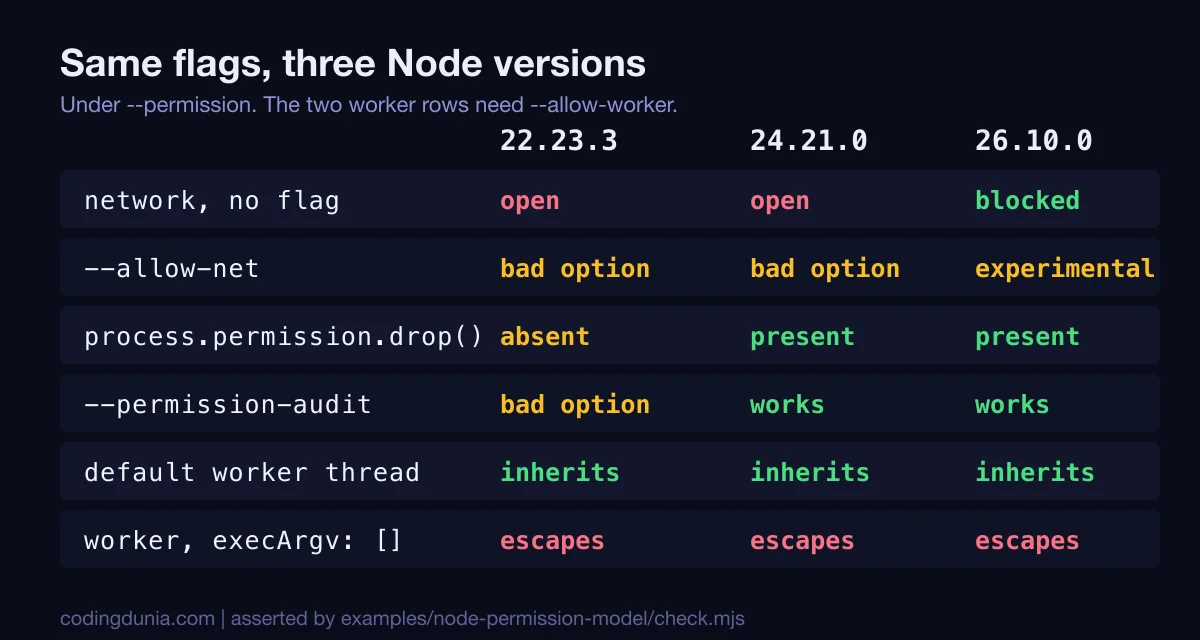
Three things, and they're all in the figure above.
process.permission.drop() and --permission-audit arrived in 24.20.0, released August 26, 2026 according to its release notes, and they're absent on 22.23.3. drop revokes a grant at runtime, and it has a sharp edge: the reference must match the original grant exactly. I granted the project folder, dropped src/ inside it, and has() still said yes. Dropping the exact folder revoked it, and the project's own files stopped being readable.
Audit mode logs what would have been denied. On 24.21.0 and 26.10.0 the key read succeeded while a diagnostics-channel message on node:permission-model:fs reported FileSystemRead. It's the right way to size grants before enforcing them, and it fits a staged rollout well: audit in CI for a week, read the channel output, then switch to --permission. Mind one oddity, though. process.permission.has() returned false for the key in audit mode even as the read worked, so don't use it to decide what is blocked there.
Node 26.10.0 finally closes the network by default and gives you --allow-net to reopen it. Passing that flag printed ExperimentalWarning: The flag --allow-net is under experimental phase. On 22 and 24 the flag is a bad option.
Is It a Sandbox, Then?
No, and the docs say so first. They describe a seat belt for trusted code and carry no guarantee against malicious code. The Node 26 page also documents a sharper limit: process._debugProcess(pid) can switch on the inspector of another process under the same OS user, and no permission scope covers it.
I think that's the right way to hold it. The failure it prevents is the boring one, a script or plugin that wanders into ~/.ssh or rewrites src/ because of a bug or a sloppy dependency. For that, --permission --allow-fs-read=. --allow-fs-write=dist in a build script is cheap, and I'd add it to CI before any dev server. For a package you suspect, run it as a different user in a container. Pairing the two isn't redundant, since the model also catches your own mistakes inside the container.
A few habits that cost nothing: start the build with a trimmed environment instead of your shell's, keep secrets outside the project directory, and delete symlinks that leave it. I haven't tested npx --node-options="--permission ...", which the docs recommend for npx, so check it against the package you care about. This was all macOS on arm64. Linux, with its own /proc and different symlink habits, deserves its own run.
Run It Yourself
cd blogs/coding-dunia/examples/node-permission-model
npm test    # no dependencies; needs Node 22.13 or newer
The script builds a throwaway HOME and a local collector, runs up to ten scenarios, and fails if any answer changes. Run it under whichever Node you ship. Version gates decide which assertions apply, so a result that differs from this page is information, not a flake.
Would I switch it on for a production server? Not yet. The blocking list is too short while the network stays open on the current LTS, and the leaks above are easy to walk into. A build step is another matter, and a short allowlist there is cheap to try.
If You're Also Dealing With...
- Pinning down which Node you actually run: the Node 24.19.0 LTS notes and the 20 to 24 migration guide.
- Install-time scripts rather than build-time ones: the pnpm migration blocks dependency build scripts by default.
- The runtime that ships permissions as a default: Bun vs Node vs Deno.