
TypeScript is JavaScript with a static type checker added on top. You write the language you already know, add annotations that describe the shape of your data, and a compiler called tsc reads them and flags mistakes before the code runs. Then the annotations are thrown away. What ships, and what actually executes in a browser or in Node, is ordinary JavaScript.
That definition sounds small, and it is. It's also the most used language on GitHub. The 2025 Octoverse report counted about 2.64 million monthly contributors in August 2025, which put TypeScript ahead of Python and JavaScript for the first time, up 66.6 percent in a year. So "what is it" isn't really the question. The question is what changes the day you add it, and what stays exactly the same. Working devs need the short, honest answer, so it comes from a small example I ran for this page, not a screenshot of someone else's.
What Does TypeScript Actually Do to Your Code?
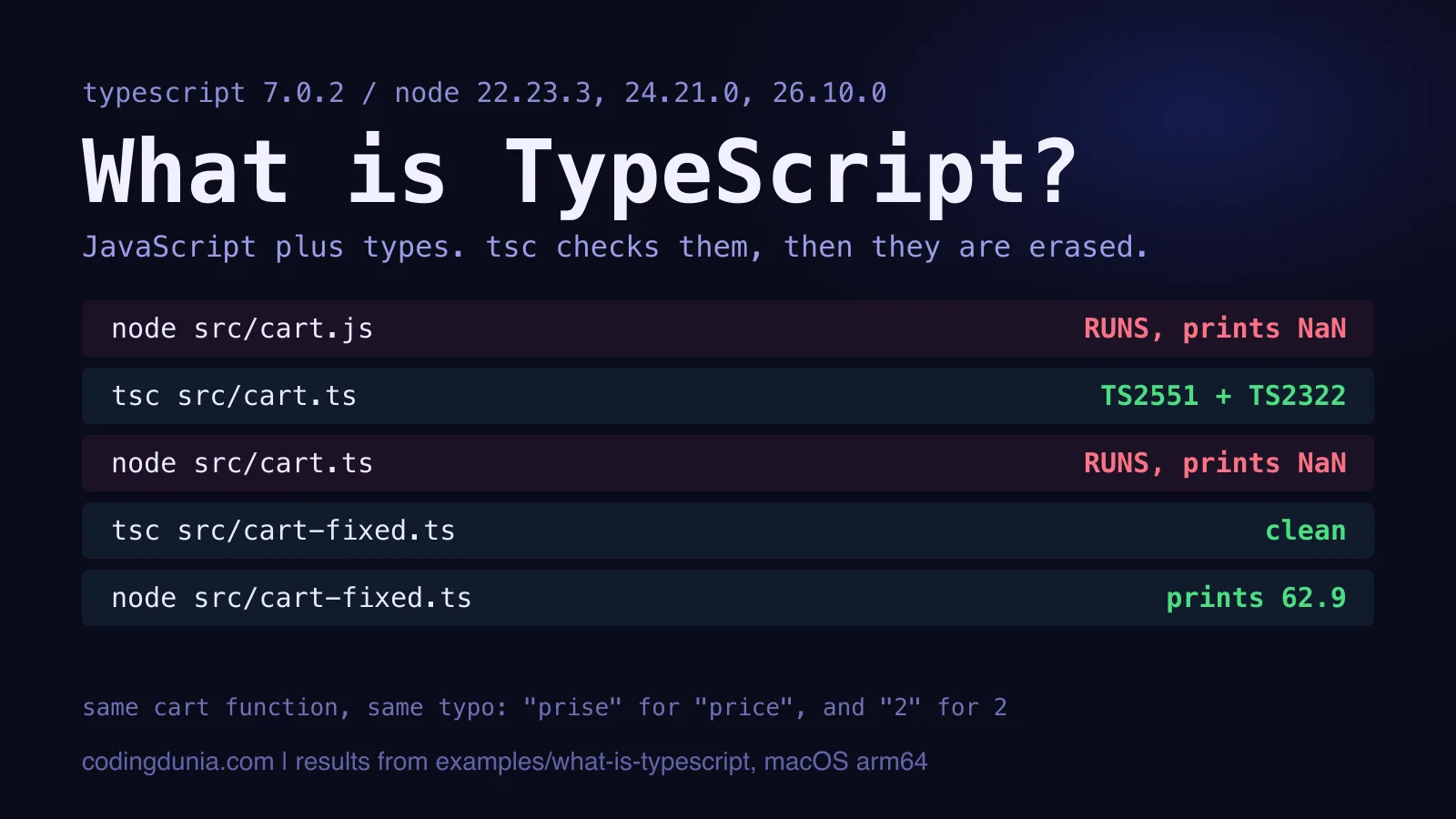
TypeScript catches one class of mistakes early: misspelled properties, wrong argument types, values that might be null. To see it work, I wrote one cart function twice, with the same logic and the same two mistakes. A property typo (item.prise for item.price) and a quantity of '2' where a number belongs. The example lives in the repo, and npm test there asserts every result below.
The JavaScript copy runs, exits 0, and prints NaN. No error. No warning. A cart total of NaN is the kind of bug that reaches a customer before it reaches you.
Here's the TypeScript copy:
// The same function and the same typo, now with types. tsc refuses it.
interface CartItem {
  name: string;
  price: number;
  qty: number;
}

export function cartTotal(items: CartItem[]): number {
  let total = 0;
  for (const item of items) {
    total += item.prise * item.qty;
  }
  return total;
}

const items: CartItem[] = [
  { name: 'keyboard', price: 49.9, qty: 1 },
  { name: 'cable', price: 6.5, qty: '2' },
];

console.log(cartTotal(items));
TypeScript 7.0.2 refuses it with exit code 1 and two diagnostics, one per mistake:
src/cart.ts(11,19): error TS2551: Property 'prise' does not exist on type 'CartItem'. Did you mean 'price'?
src/cart.ts(18,32): error TS2322: Type 'string' is not assignable to type 'number'.
Fix both and the file compiles clean and prints 62.9 (49.9 plus 6.5 times 2). That's the whole day-one change: red squiggles in your editor and a compiler exit code you can wire into CI.
Most of what TypeScript gives you is a typo detector that runs before your users do, and for most projects that alone pays for the setup.
Is that a modest claim? Yes, deliberately. People oversell the type system and then get disappointed when it doesn't prevent logic bugs. It prevents a narrower set of bugs, and those happen to be the dumb, common, embarrassing ones.
Why Does the Checker Have to Run?
A type checker nobody runs is decoration, and one caveat from this very repo shows how easily that happens. The root tsconfig.json of the monorepo behind this site uses "files": [] plus project references, so a bare tsc --noEmit there reports success while checking nothing, and a small script has to check each project instead. If your CI never calls tsc, you have annotations, not safety.
Is TypeScript a Different Language or Just JavaScript?
TypeScript is JavaScript with extra syntax for types, and the official homepage describes compiling it as deleting those types. That description is close to literal, and it explains most of what follows in this section.
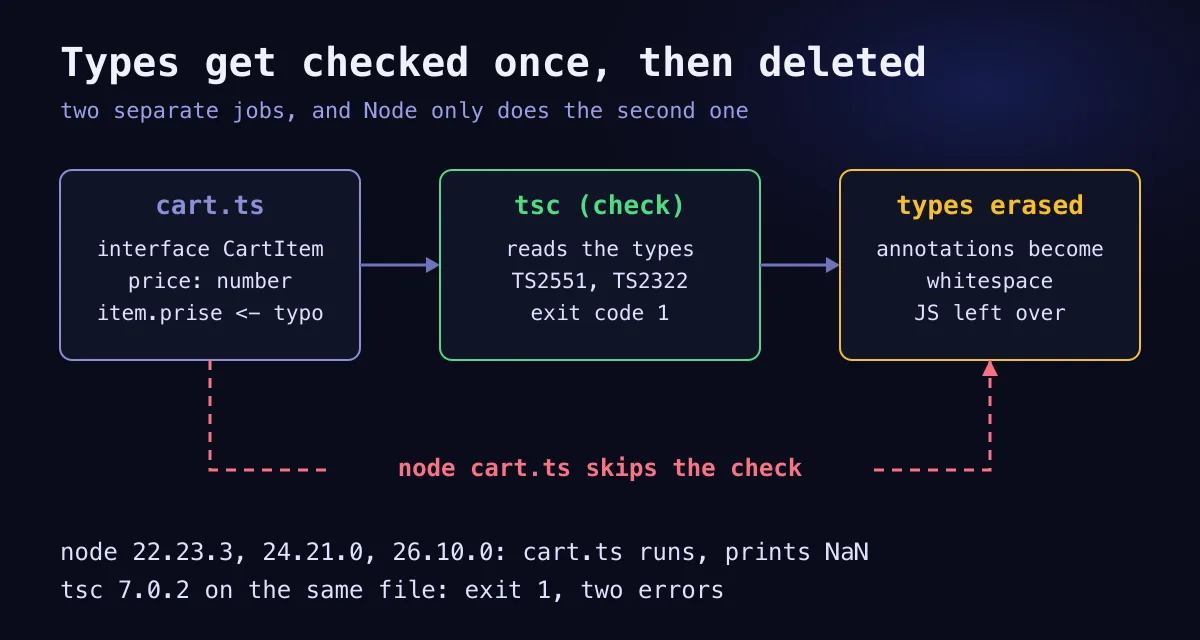
Type erasure means the compiler removes every annotation, interface and type alias and leaves the JavaScript underneath untouched. Two consequences follow. TypeScript runs anywhere JavaScript runs, because that's all that's left at runtime. And types cost nothing in the shipped bundle, since nothing about them survives. I didn't benchmark that, but erasure is the mechanism, so a type-only change can't alter what executes.
Not every feature is erasable. An enum generates a real object, so it needs code generation. Runtime namespaces and constructor parameter properties do too. I ran an enum through Node on 22.23.3, 24.21.0 and 26.10.0 and each stopped with ERR_UNSUPPORTED_TYPESCRIPT_SYNTAX. A union of string literals does the same job with no runtime cost, which is why I'd reach for that first. The TypeScript cheat sheet lists both side by side.
The deeper type features (generics, mapped types, narrowing) sit on top of this same erasable base. If you want the next layer after this page, the generics guide and the utility types guide pick up where this one stops.
Can Node Run TypeScript Without a Build Step Now?
Node 22.18 and later run .ts files directly, with one hard limit. Type stripping is Node's built-in way of running TypeScript: it replaces the annotations with whitespace, executes the JavaScript that remains, and never checks a single type. Node's own documentation lists it as enabled by default from 22.18.0 and as stable from 24.12.0. The Node 22 page still carries a release-candidate stability marking, while the Node 24 page says stable.
I ran the same files on four Node versions:
| Node | node src/cart.ts | node src/enum.ts | Type imported without type |
|---|---|---|---|
| 20.19.5 | ERR_UNKNOWN_FILE_EXTENSION | not run | not run |
| 22.23.3 | runs, prints NaN | ERR_UNSUPPORTED_TYPESCRIPT_SYNTAX | SyntaxError: no export named CartItem |
| 24.21.0 | runs, prints NaN | ERR_UNSUPPORTED_TYPESCRIPT_SYNTAX | SyntaxError: no export named CartItem |
| 26.10.0 | runs, prints NaN | ERR_UNSUPPORTED_TYPESCRIPT_SYNTAX | SyntaxError: no export named CartItem |
What surprised me: Node happily ran the exact file tsc had just rejected. It printed the same NaN as the JavaScript version, with no warning on any of the three newer versions. Stripping swaps types for whitespace, and that's all it does. Keep tsc --noEmit in CI or you've bought the syntax and none of the checking.
The third column is the trap people hit first. A type import without the type keyword looks like a value import to Node, so it fails at runtime. Node's docs suggest verbatimModuleSyntax and erasableSyntaxOnly in tsconfig.json to surface both traps in the editor. I haven't tested those two flags here, so treat that as the documentation's advice, not mine. For startup timings against tsx and ts-node, see the native TypeScript in Node.js guide.
What Changed in TypeScript During 2026?
TypeScript's engine changed in 2026 while the language barely moved: version 7.0 replaced the JavaScript-based compiler with a native port written in Go, and the type system you write against stayed the same.
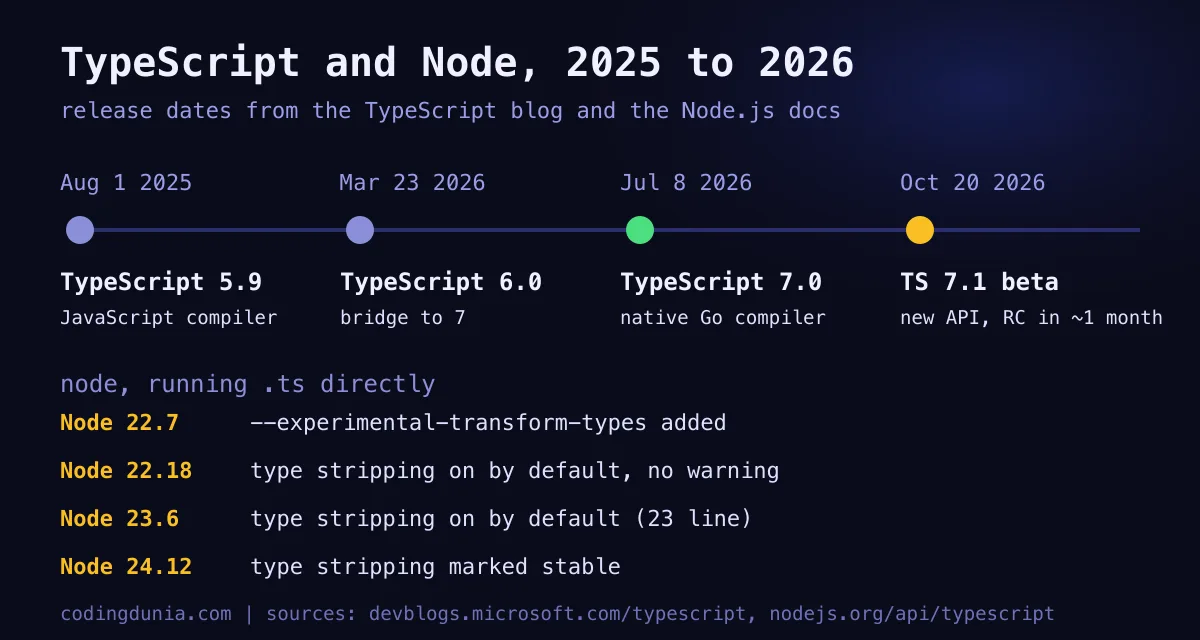
TypeScript 6.0 arrived on March 23, 2026 as a bridge release. TypeScript 7.0 followed on July 8, a native port of the compiler written in Go. Microsoft's announcement reports full builds roughly 8x to 12x faster, with the VS Code codebase dropping from 125.7 seconds to 10.6. npm install -D typescript now installs the native tsc. For the full story, see the TypeScript 7.0 GA write-up, and for the differences that bite when you upgrade, the 6 vs 7 comparison and the migration guide.
Two defaults matter if you're learning TypeScript today. The announcement says 7.0 turns strict on by default, and I saw it: on 7.0.2, with no tsconfig.json and no flags, a function with an untyped parameter fails with TS7006. And the older removed options, like target: es5 and baseUrl, are now hard errors.
As of October 23, 2026, npm view typescript version returns 7.0.2, and the beta tag points at 7.1.0-beta. That beta was announced on October 20 with a new programmatic API and a --target es2026 option, and a release candidate is expected about a month later. I haven't run the 7.1 beta, so I'm only reporting what the announcement says.
What Does TypeScript Not Change?
TypeScript changes less than most introductions admit. It doesn't touch runtime data, logic, escape hatches or your need for tests, and each of those is worth a sentence before you commit to adopting it across a whole codebase.
- Runtime data. Types describe what you hope arrives. A JSON response from an API can be anything, and TypeScript won't stop it. Validate at the boundary with something like Zod.
- Logic.
price * qtycan be the wrong formula and still type-check perfectly. - Escape hatches. One
anyswitches checking off for everything it touches. The strict mode guide covers how to keep that under control. - Your need for tests. The two stack up. Types catch shape errors, and tests catch wrong answers.
I'd go further than most introductions do. A project with loose settings and any sprinkled everywhere is closer to JavaScript with extra typing effort than to TypeScript, and I think half-adoption is the worst of both worlds.
None of this is an argument against adopting it. It's an argument for expecting the right thing, which is a faster feedback loop on one kind of mistake and a shared vocabulary for the shape of your data.
How Should You Start?
Starting with TypeScript takes three steps on any project, and the order matters because each one makes the next one useful:
- Install
typescriptas a dev dependency. - Turn strict mode on, which is already the default in 7.
- Run
tsc --noEmitin CI so its errors can actually block a merge.
On a new project, do all three on day one. Retrofitting strictness later is the expensive route, because every loose spot you wrote in the meantime becomes an error you have to triage.
On an existing JavaScript project, rename one file at a time and let the error list tell you what to fix first. Start with the code that handles money, dates and user input, since that's where a NaN costs the most. Do you need to convert everything before you see value? No. A single typed module already produces editor feedback.
Whichever route you take, the habit that matters is the one the example shows. Run the checker, read the exact diagnostic code, fix the cause. Everything else, including the Go compiler, only makes that loop faster.