
Everything in this guide comes from GitHub's own changelog posts of September 17 and October 22, 2026, the usage metrics field reference and the REST endpoint docs, all read on October 30. The TypeScript reader at the end compiles under tsc 7.0.2 with strict on and passes nine checks on Node 22.23.3. It ran against a synthetic report, though, not a live organization. I don't have an org with Copilot metrics to point it at, and I'd rather say that than invent a dashboard.
TL;DR: Since October 22, Copilot's usage metrics reports name the skills, custom agents, MCP servers, slash commands and plugins your organization creates, up to 25 per array plus a trailing
other. Readtotals_by_mcpas connection attempts (failed ones included), never add plugin counts to skill counts, and treatnullas missing data rather than zero.
What Changed on October 22?
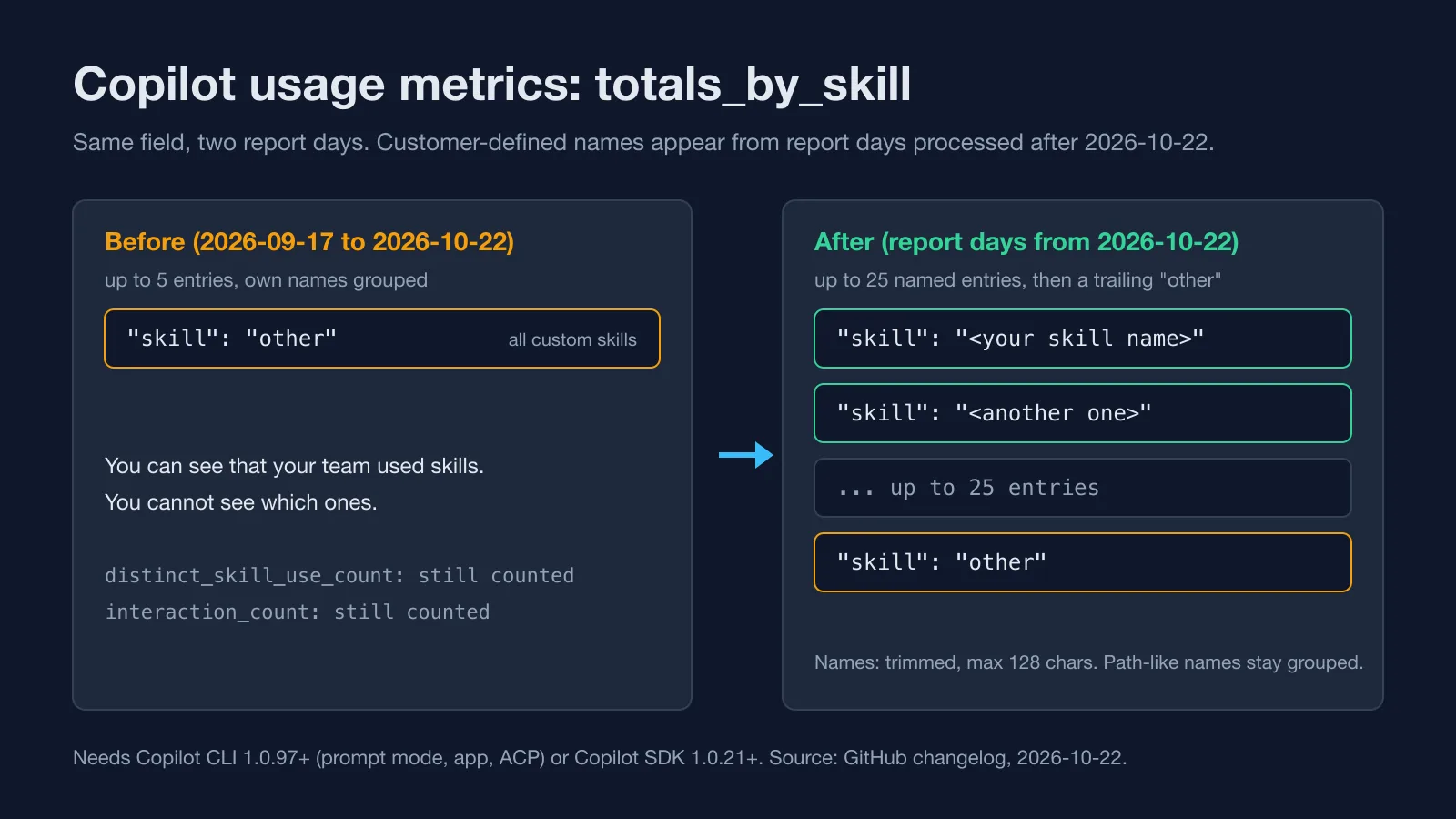
The fields themselves aren't new. On September 17 GitHub added five arrays and five distinct counts to the Copilot usage metrics reports: totals_by_skill, totals_by_custom_agent, totals_by_mcp, totals_by_slash_cmd and totals_by_plugin, plus distinct_skill_use_count and its four siblings. Each array held the top five items. The catch was in the small print. Only GitHub-provided names were shown, and every customer-defined skill, custom agent, MCP server and plugin landed in one entry called other. Your own slash commands went into custom.
So a team that had written a design-tokens skill and a component-review agent could see that "skills" were being used. Which ones? No idea.
The October 22 changelog fixes exactly that. Configured names now appear in all five arrays, each array keeps up to 25 named entries per record instead of five, and anything past the top 25 rolls into a trailing other. interaction_count and the distinct_* counts are calculated the same way as before.
There are conditions, and they matter more than the headline:
| Condition | What the changelog says |
|---|---|
| Clients that report names | Copilot CLI (interactive and prompt mode), the GitHub Copilot app, Copilot SDK-based clients such as VS Code and JetBrains IDEs, and ACP integrations |
| Minimum versions | Copilot CLI 1.0.97+ for prompt mode, the app and ACP; Copilot SDK 1.0.21+ for SDK clients |
| IDE plugins not built on the SDK | no names; their items stay under other or custom |
| Name handling | trimmed, capped at 128 characters; names that look like file paths stay grouped |
| History | names only for report days processed after the release; no backfill |
That last row bites anyone who builds a 28-day chart this week. The left part of the chart will be one fat other bar, and nothing changed in your team's behavior to cause the jump.
Why Should a UI Team Care?
Because the customizations a front-end team builds are almost all of this type. A skill that knows your design tokens and spacing scale. A custom agent that reviews components against your accessibility checklist. A Storybook MCP server so the agent can look up real stories instead of guessing props. A /component slash command for the scaffold you're tired of typing.
Somebody built each of those, usually on top of their real work. Until now, nobody could tell whether the team used them or quietly went back to plain chat. If you've read our MCP explainer, you know the protocol makes it cheap to plug a tool in. It never told you whether anyone kept it plugged in.
How Do You Pull the Report?
It's two hops, and the first one doesn't return data. The REST docs list six organization endpoints and six enterprise ones under /copilot/metrics/reports/. For per-user data on one day, the organization version is:
GET /orgs/{org}/copilot/metrics/reports/users-1-day?day=2026-10-29
Accept: application/vnd.github+json
Authorization: Bearer <token>
X-GitHub-Api-Version: 2026-03-10
The response is an envelope with download_links (an array of signed URLs) and report_day. The links expire after a "limited expiration time" that the docs don't quantify, so fetch the files right away and never store the URLs. The files are NDJSON: one JSON record per line, one record per user per day.
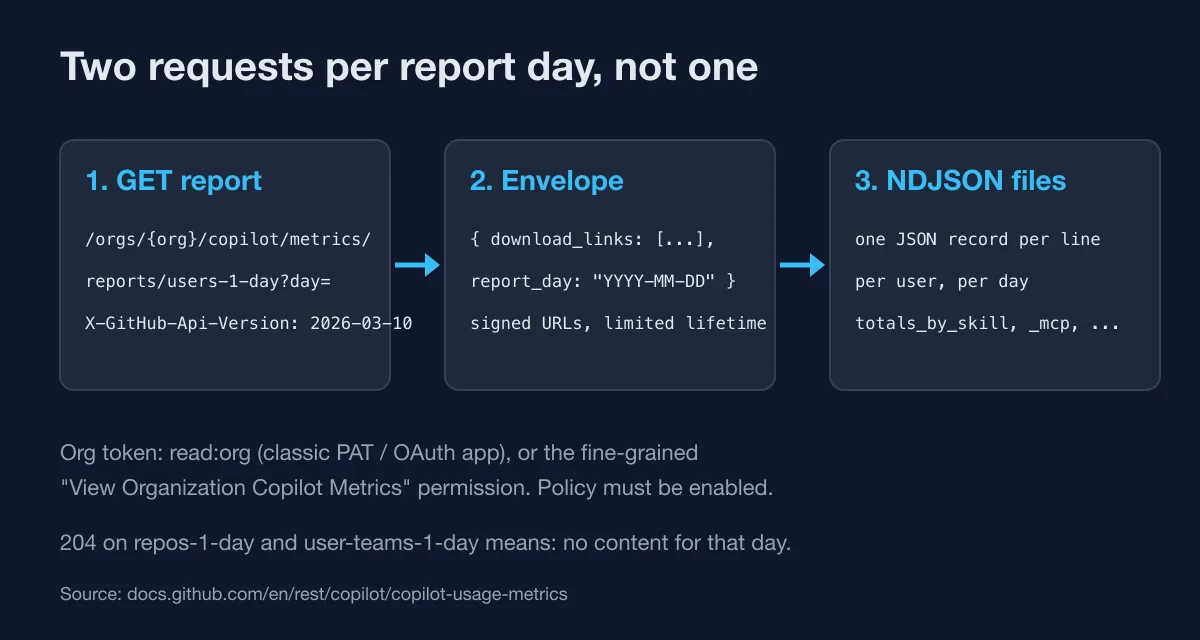
Access is narrower than most tokens you already have lying around. For organization endpoints you need to be an org owner or hold the fine-grained "View Organization Copilot Metrics" permission; classic PATs and OAuth app tokens need read:org. The "Copilot usage metrics" policy has to be enabled too. Per the docs, the users and organization 1-day reports go back to October 10, 2025, with up to one year of history available.
What Does Each Count Actually Measure?
This is where most dashboards will go wrong. Every array entry has two keys, a name key and interaction_count, but the name key differs per array and so does what one count means.
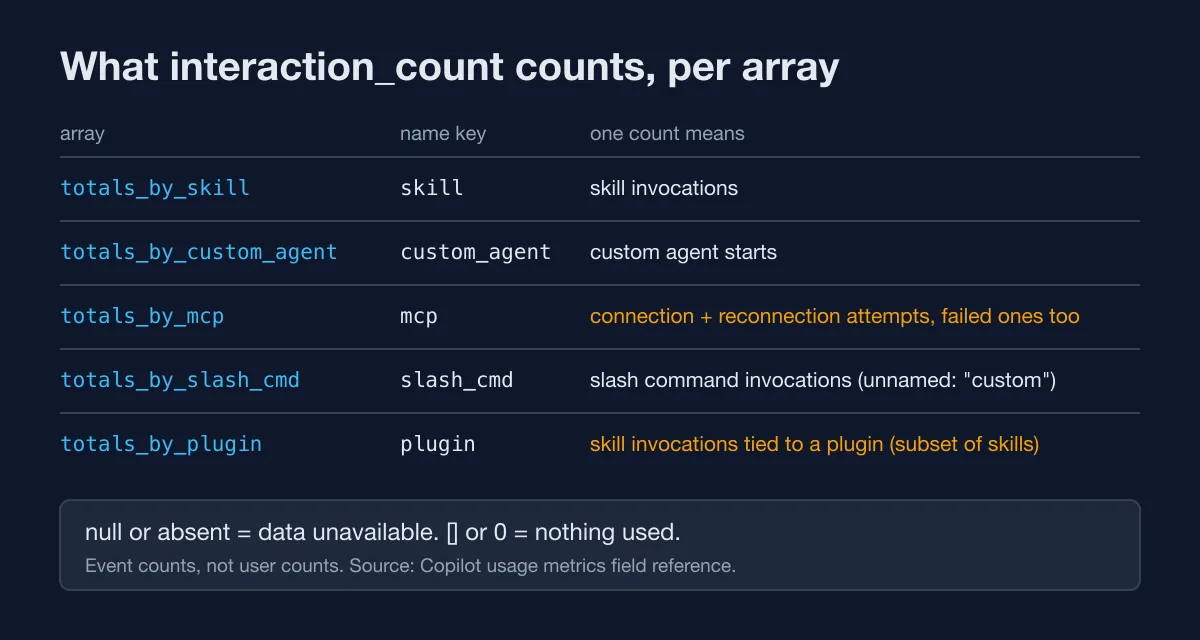
Which of those rows would you have guessed wrong? Two deserve a second look.
totals_by_mcp counts connection attempts, not tool calls. The field reference says it records "successful or failed" connection and reconnection attempts. Think about what that does to a local Storybook MCP server that only exists while storybook dev is running. If the CLI tries to connect while the dev server is down, that failed attempt still counts. Forty attempts could be forty productive sessions. It could also be forty failures against a server on the wrong port. The report can't tell you which.
totals_by_mcp is a connection log, not a usage chart. A server that keeps failing to connect scores higher than one that works.
totals_by_plugin is a subset of totals_by_skill. Plugin counts are skill invocations tied to a plugin. Put both in one stacked bar and you've counted those invocations twice. I'd keep plugins on a separate chart entirely.
Then there's the difference between null and []. An empty array or a distinct count of 0 means nothing was used. A null or absent field means the data wasn't available for that record, which the docs tie to rollout. Collapse the two and a user on an old client becomes a user who "stopped using" your skill.
One more trap: the distinct_*_use_count fields in per-user records count identifiers for that user. Summing them across users doesn't give you the number of distinct skills in the org, because two people using design-tokens both count it. The aggregated reports count each item once across the org, so use those for that question.
A Typed Reader for the Per-User Report
Here's the model I'd start from. It's a slice of the record, typed from the field reference, with the name key derived from the kind so totals_by_mcp entries can't be read with a skill key by accident:
export type CustomizationKind = "skill" | "custom_agent" | "mcp" | "slash_cmd" | "plugin";

export type CustomizationEntry<K extends CustomizationKind> = {
  readonly [P in K]: string;
} & { readonly interaction_count: number };

// null or absent: unavailable. []: available, nothing used.
type Nullable<T> = T | null | undefined;

export interface UserDayRecord {
  readonly day: string;
  readonly user_login: string;
  readonly totals_by_skill?: Nullable<ReadonlyArray<CustomizationEntry<"skill">>>;
  readonly totals_by_custom_agent?: Nullable<ReadonlyArray<CustomizationEntry<"custom_agent">>>;
  readonly totals_by_mcp?: Nullable<ReadonlyArray<CustomizationEntry<"mcp">>>;
  readonly totals_by_slash_cmd?: Nullable<ReadonlyArray<CustomizationEntry<"slash_cmd">>>;
  readonly totals_by_plugin?: Nullable<ReadonlyArray<CustomizationEntry<"plugin">>>;
}
The fetch is the two hops from above. Note the 204 branch: the docs list it for the repos and user-teams reports, and handling it costs one line:
export async function fetchUsersDay(org: string, day: string, token: string) {
  const url = `https://api.github.com/orgs/${encodeURIComponent(org)}/copilot/metrics/reports/users-1-day?day=${day}`;
  const res = await fetch(url, {
    headers: {
      Accept: "application/vnd.github+json",
      Authorization: `Bearer ${token}`,
      "X-GitHub-Api-Version": "2026-03-10",
    },
  });
  if (res.status === 204) {
    return [];
  }
  if (!res.ok) {
    throw new Error(`users-1-day ${day}: HTTP ${res.status}`);
  }
  const { download_links } = (await res.json()) as { download_links: string[] };
  const records: UserDayRecord[] = [];
  for (const link of download_links) {
    const file = await fetch(link); // signed URL, no auth header
    if (!file.ok) {
      throw new Error(`download ${day}: HTTP ${file.status}`);
    }
    records.push(...parseNdjson(await file.text()));
  }
  return records;
}
The summarizer does three things a naive reduce skips. It keeps other and custom out of the named rows, it counts unavailable records separately from empty ones, and it tracks how many users touched each item:
// excerpt from src/summarize.ts
const BUCKETS = new Set(["other", "custom"]);

for (const record of records) {
  const entries = record[FIELD_BY_KIND[kind]];
  if (entries === null || entries === undefined) {
    recordsUnavailable += 1; // missing data, not zero
    continue;
  }
  if (entries.length === 0) {
    recordsEmpty += 1;
    continue;
  }
  for (const entry of entries) {
    const name = (entry as Record<string, unknown>)[kind];
    if (typeof name !== "string") {
      continue;
    }
    if (BUCKETS.has(name)) {
      bucketed += entry.interaction_count;
      continue;
    }
    const row = byName.get(name) ?? { interactions: 0, users: new Set<string>() };
    row.interactions += entry.interaction_count;
    row.users.add(record.user_login);
    byName.set(name, row);
  }
}
I ran the full version against a five-user fixture I wrote by hand in the documented shape. The names in it (design-tokens, component-reviewer, storybook) are made up, and so are the numbers. What the run shows is the arithmetic, not anyone's adoption. Here's the summary line it printed:
skill         named  93%  bucketed  2  unavailable 1  design-tokens=20/3u, a11y-checklist=3/1u, button-scaffold=3/1u
mcp           named 100%  bucketed  0  unavailable 1  storybook=37/2u, playwright=2/1u, figma=1/1u
slash_cmd     named   0%  bucketed  4  unavailable 1  -
The named column is the one I'd put on the dashboard first. It's the share of interactions the report could attach a name to. When it drops, either someone's on a client below CLI 1.0.97 or SDK 1.0.21, or your team has more than 25 items in play. Both are worth knowing. And the averages move more than you'd guess: in that fixture, average skill interactions per user is 7.0 with the unavailable record left out of the denominator and 5.6 with it counted as zero. Same data, a 20% gap, purely from how you read null.
The whole thing, with the fixture, the nine checks and a package.json pinned to typescript@7.0.2, lives in examples/copilot-usage-metrics-customizations/, next to this blog's other runnable examples. npm test type-checks it and runs the checks. The fetch module is type-checked but not executed.
What Should You Put on the Dashboard?
My take, and you're free to disagree: skip the leaderboard. A ranked list of skills by interaction count rewards whichever skill fires on every prompt, and the skill that saves an hour once a week will look dead next to it. Users per item, from the per-user report, says more about whether a customization stuck than any count does.
A short list of what I'd chart for a UI team:
- users per skill and per custom agent, per week;
- the named share per array, as a health line for client versions;
totals_by_mcpnext to the number of sessions, flagged as attempts in the chart title so nobody reads it as tool usage;- plugins on their own chart, never stacked on skills.
And look at the names before the report leaves your org. The changelog says it outright: review names before sharing externally. An agent called acme-checkout-redesign-q1 tells a vendor more than you meant to.
Treat all of it as trend data. GitHub's reference says the customization metrics come from client telemetry and can undercount, for example with outdated clients or blocked telemetry, and it explicitly says not to use these arrays for exact adoption. If your team writes its customizations the way our AI coding tools guide suggests, small and specific, a weekly trend is all you need to decide which ones to keep. Is a skill nobody calls after a month worth maintaining? Probably not, and now you can find out without a survey.
If you also run Copilot across a big workspace, our notes on Copilot Workspace in a TypeScript monorepo cover the instruction files that sit next to these skills.