

TL;DR: Install
claude-code-routeron Node 22, add your local endpoint as a custom provider, and write one Global Routing rule: ifrequest.body.modelcontainshaiku, rewrite it toai/gpt-oss. That is the entire split. Two things every older guide still gets wrong: version 3 has noconfig.jsonand noccr codecommand, and the Claude Code login it offers to import cannot authenticate, so the hosted half needs a real API key.
The previous article ended with a working local setup and a recommendation not to use it as your only model. Full local loses on wall-clock, on multi-file reasoning, and once you buy hardware that holds a decent model, on money too.
None of which means the local model should sit idle. Claude Code does not send one kind of request. It sends the hard ones you asked for, and a steady trickle of housekeeping around them, and only the first kind justifies a frontier model.
I installed the router to write this. Several things the older guides say turned out to be out of date, which is the useful part.
What Does the Router Actually Decide?
The thing to understand before touching anything: you do not classify tasks. Claude Code already stamps each request with a model tier, and the router matches on that stamp. Cheap housekeeping goes out marked for the small model; your actual work goes out marked for the big one.
A rule is a condition plus a rewrite. Match on something in the request, change something in the request, forward it on.
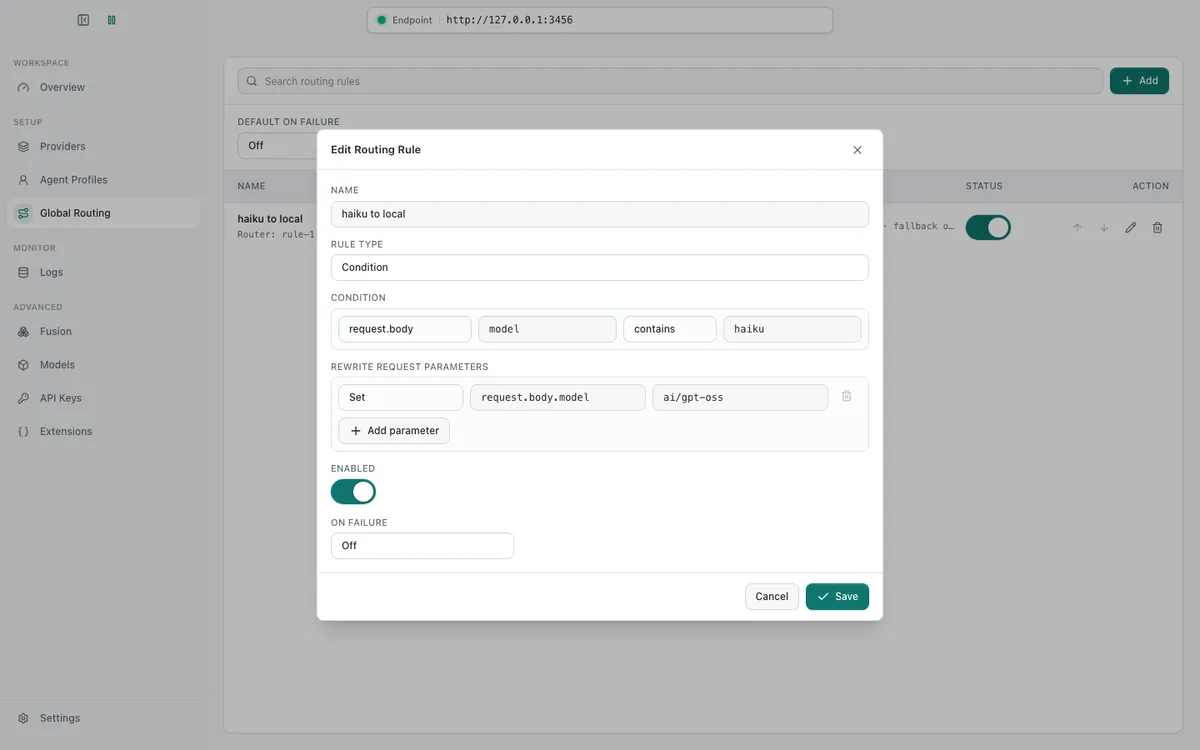
Notice what this is not. Nothing inspects your prompt and decides it looks easy. A short question about a subtle race condition carries the normal tier stamp like everything else, which is correct, and a long mechanical summary carries the cheap one, which is also correct, but neither decision involved judgement about the work.
Step 0: Which Version Traps Should You Know?
Deal with these first, because both produce errors that point somewhere else.
Node 20 is not enough. The package declares node >=22 in its engines field, so on a Node 20 shell it won't run until you switch:
nvm use 22
npm install -g @musistudio/claude-code-router
Version 3 threw away the config file. Every guide written before it, including the ones near the top of the search results, tells you to edit ~/.claude-code-router/config.json with a Providers array and a Router block holding default, background, think and longContext. That file does not exist any more. Version 3.0.22 keeps its configuration in config.sqlite and expects you to use a web UI. The README is explicit that you should not edit the live SQLite yourself.
The CLI changed with it. There is no ccr code:
Usage:
  ccr start [--host <host>] [--port <port>] [--open|--no-open] [--gateway|--no-gateway]
  ccr ui [--host <host>] [--port <port>]
  ccr stop
  ccr <profile-name-or-id> [cli|app] [-- <agent args>]
You launch a named profile, not a fixed subcommand.
Step 1: Is the Local Side Ready Before Adding a Hop?
A router in front of a broken endpoint produces errors that blame the router.
docker model ps
curl -s http://localhost:12435/anthropic/v1/messages \
  -H "Content-Type: application/json" \
  -d '{"model":"ai/gpt-oss","max_tokens":16,"messages":[{"role":"user","content":"Reply with ready."}]}'
Port 12435 is the schema-stripping proxy from the previous article, not Model Runner's own 12434. Point the router at 12434 and the local branch will 400 on the first tool-bearing request with failed to parse grammar, for exactly the reasons bisected there.
If the model is not resident, load it with the window it needs and a generous keep-alive, because routed requests arrive sporadically and a model that unloads between them turns every one into a cold start:
docker model configure --context-size 65536 --keep-alive 30m ai/gpt-ossStep 2: How Do You Start the Service?
ccr start --no-openCCR service started at http://127.0.0.1:3458/?ccr_web_token=<token> (pid 49437).The gateway that Claude Code will talk to runs on 127.0.0.1:3456; the management UI is the 3458 URL above. That token is a credential. Do not paste the URL into a ticket, and keep both listeners on localhost.
Step 3: Does the Import Really Solve Authentication?
The first-run wizard scans your machine and offers this:
Claude Code login detected. Click Import to add it as a gateway provider.
It is the most inviting button on the screen and it does not work. The import succeeds, the provider appears, and then the account check fails:
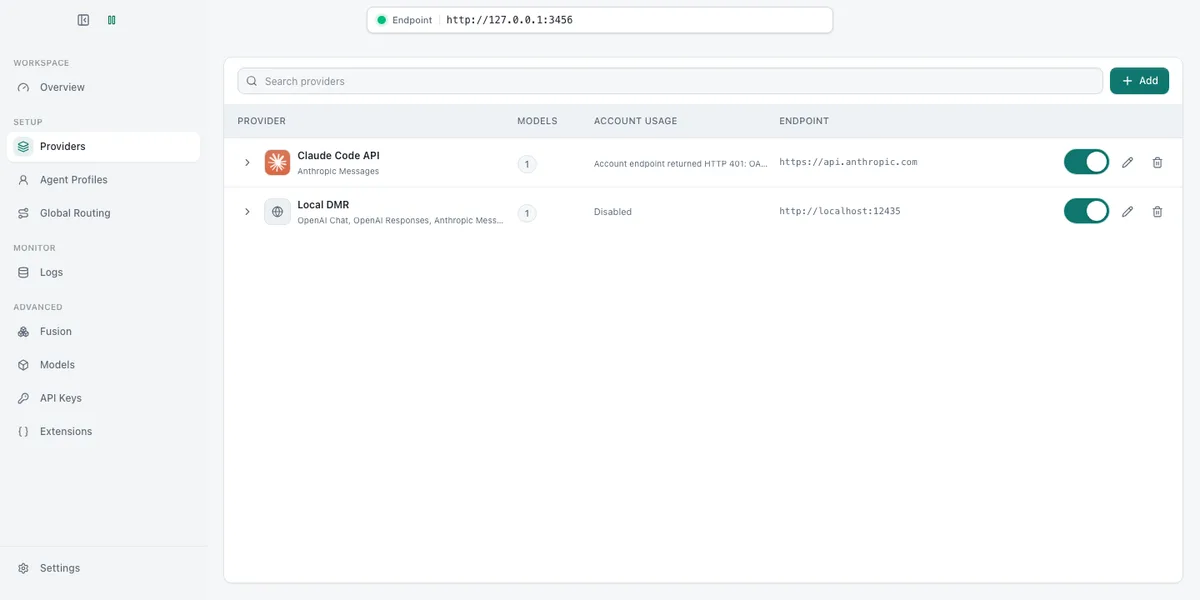
Account endpoint returned HTTP 401: OAuth access token has expired.
Re-authenticate to continue.
Claude Code authenticates a subscription with a short-lived OAuth token that it refreshes itself. The router copies the token and has no way to refresh it. So the hosted half of a hybrid setup needs a real Anthropic API key, billed separately from a Max subscription. That is a genuine cost the routing guides do not mention: you are not splitting a subscription, you are adding metered API spend and hoping the local branch offsets it.
Step 4: How Do You Add the Local Provider Correctly?
In Providers, click Add. The preset list offers Anthropic, and picking it feels right because the local proxy speaks the Anthropic messages protocol. It is a trap: a preset hard-codes its vendor URL and the form shows no endpoint field at all. I saved a provider called Local DMR that was quietly pointing at api.anthropic.com.
Choose Other / custom API endpoint instead. The endpoint field appears:
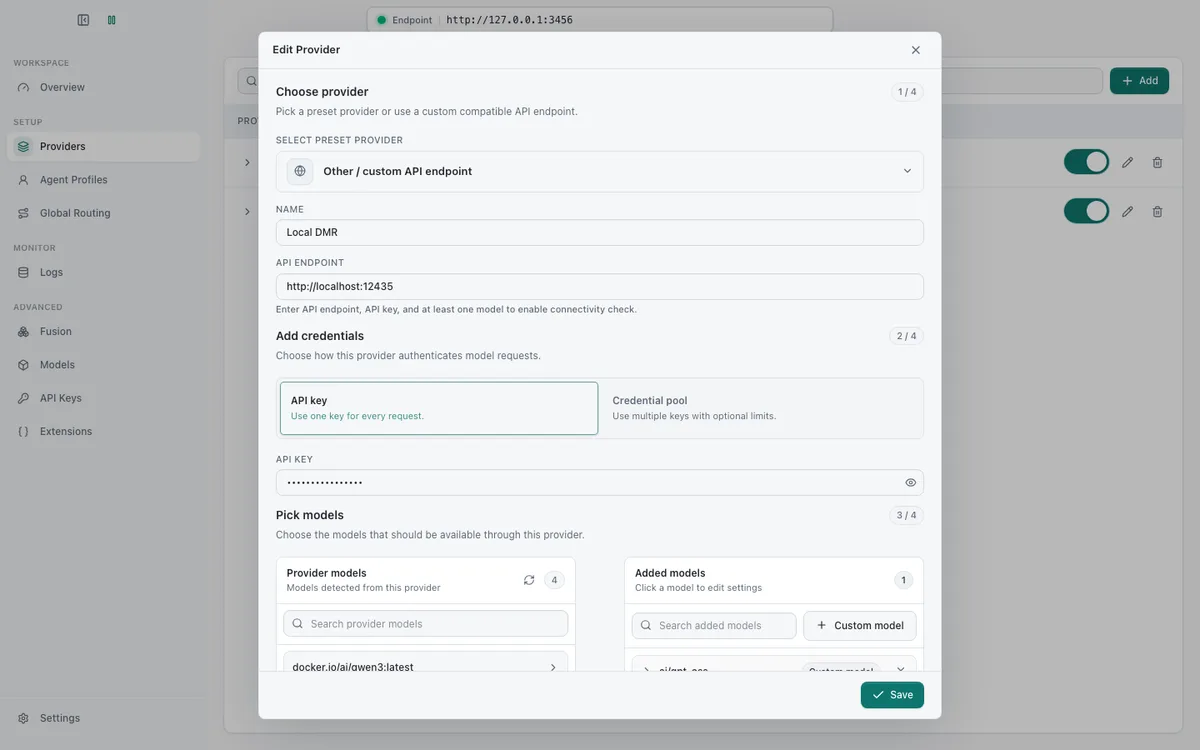
Set the endpoint to http://localhost:12435, give it any placeholder API key (nothing checks it locally, but an empty value fails validation), and add ai/gpt-oss with Custom model, because the runner returns no model list to enumerate.
Protocol detection then runs against the proxy and reports Anthropic Messages available alongside both OpenAI dialects. No transformer needed, which is the payoff for Model Runner carrying three dialects on one port.
Step 5: How Do You Write the Routing Rule?
Open Global Routing and add a rule. Mine:
| Field | Value |
|---|---|
| Condition source | request.body |
| Path | model |
| Operator | contains |
| Value | haiku |
| Rewrite | Set request.body.model = ai/gpt-oss |
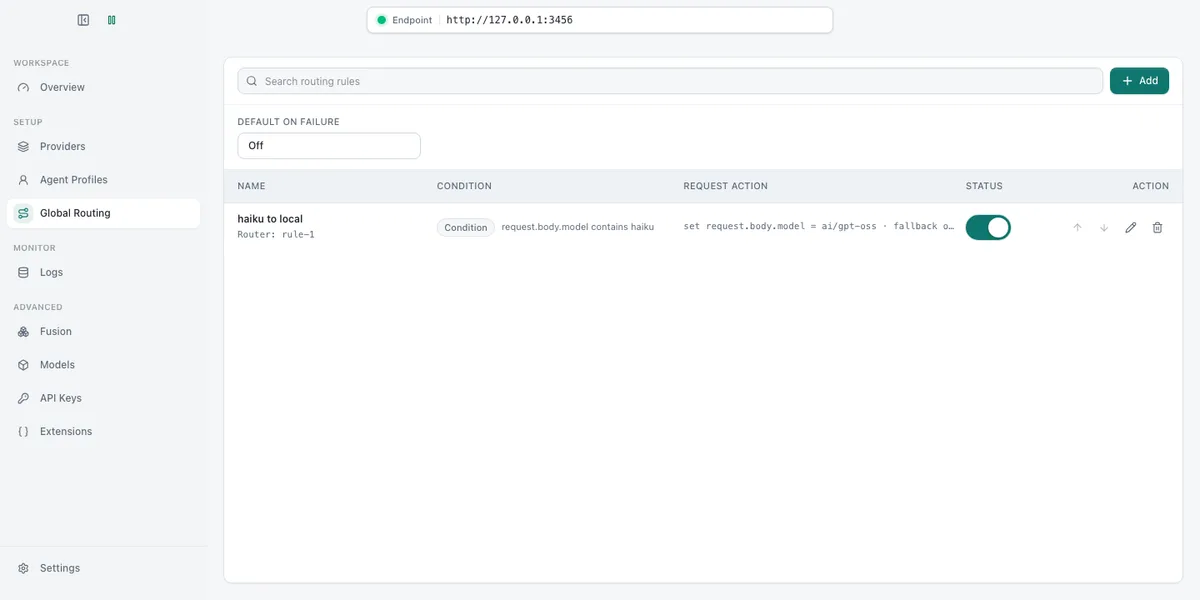
The condition can also read request.header or request.auth, and the rewrite can delete keys or push into arrays, so the same engine covers considerably more than a model swap. For hybrid routing you need exactly one rule.
Leave On failure off while you are testing. Retry and fallback chains hide a broken local branch behind a silent redirect to the hosted one, and then you cannot tell whether the split is working.
Step 6: How Do You Keep a Profile From Hijacking Everything?
In Agent Profiles, create a Claude Code profile. The field that matters is effect scope: set it to Only opened from CCR, not System default. System default rewires every claude invocation on the machine, which is exactly the mistake the previous article warned about with a stray ANTHROPIC_BASE_URL.
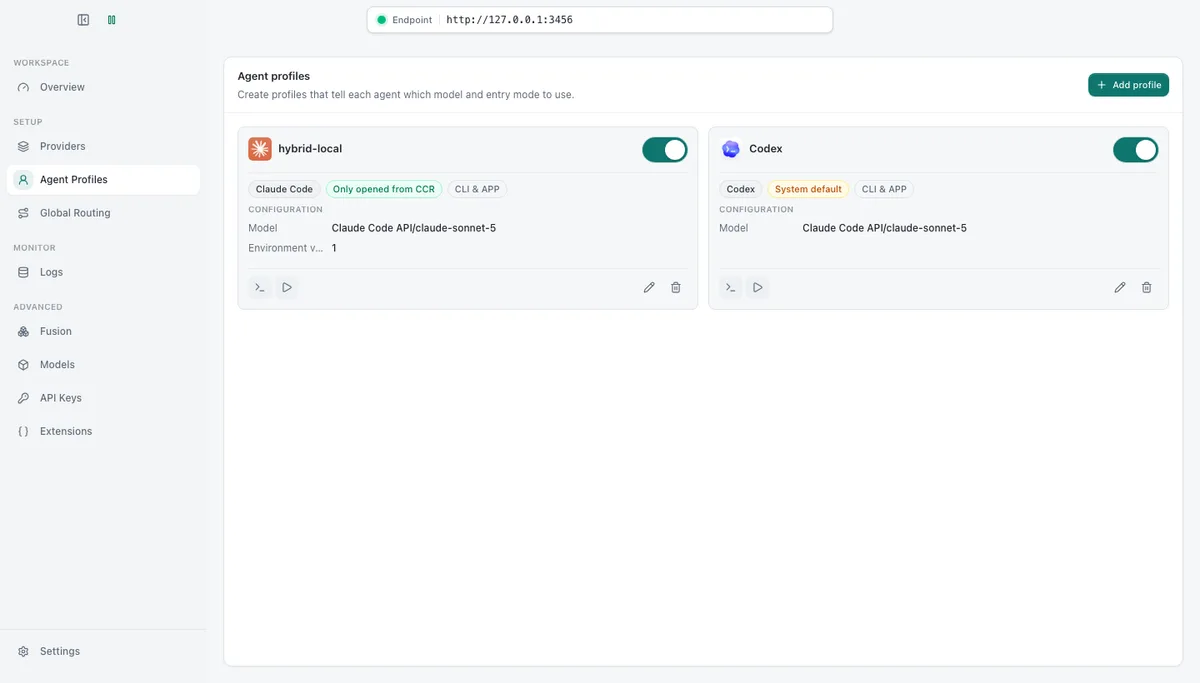
Then launch by profile name:
ccr hybrid-localAlso unset the variable from the previous article, or it wins and everything goes local:
unset ANTHROPIC_BASE_URLStep 7: How Do You Prove the Split Is Real?
This is the step people skip, and then they run for a month convinced they are saving money.
The router's Overview page counts requests, tokens and cost per provider, which is the easiest instrument you will get:
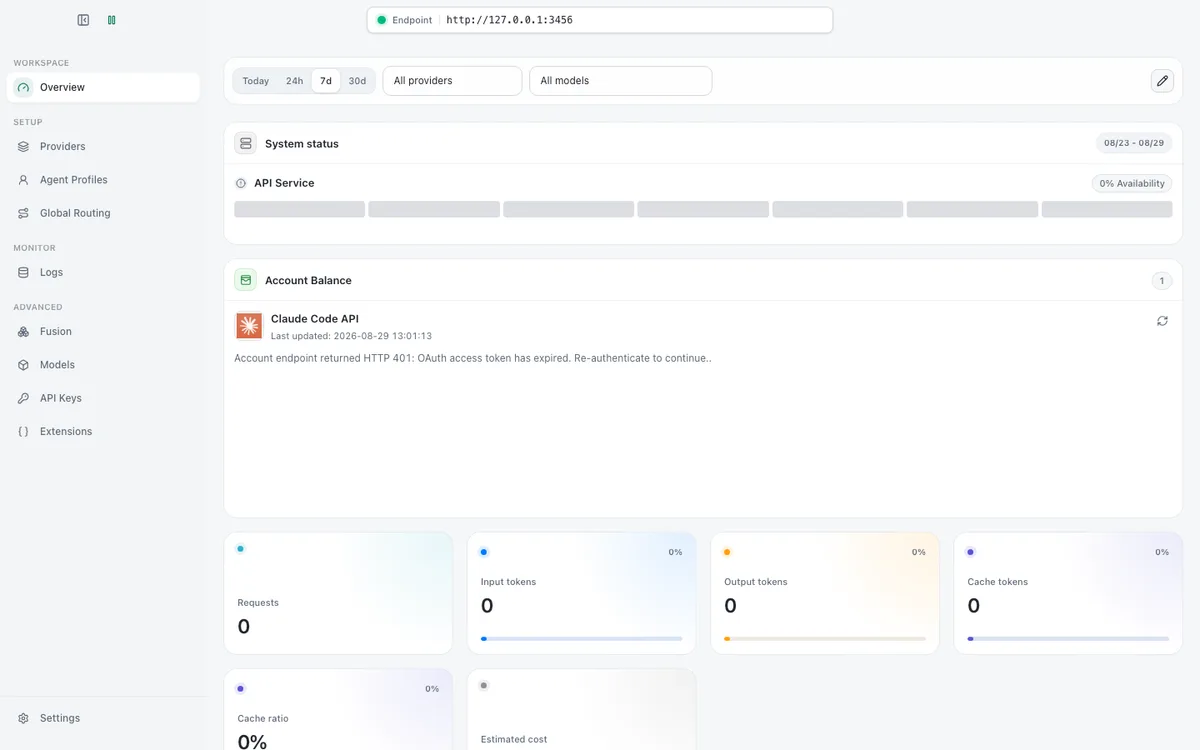
Cross-check it from the other end, so you are not trusting one counter:
docker model requests --follow --model ai/gpt-oss | jq -c '{in: .usage.input_tokens}'No lines at all means the split is not happening, and there are only three plausible reasons: ANTHROPIC_BASE_URL is still set, the rule's rewrite value does not exactly match a model you declared on the local provider, or the session produced no cheap-tier traffic, which happens in short sessions.
What I cannot give you is my own ratio. The hosted branch never authenticated, for the reason in step 3, so I have a verified local branch and a verified rule but no live session split. Anyone quoting you a percentage without saying how they counted is quoting a README. Count your own.
Which Parts Do Not Improve?
Routing changes where requests go, not what happens when they arrive, so every measurement from the previous article still holds on the local branch.
The 35,482-token handshake still ships. A routed request carries the same system prompt and the same tool schemas as any other, so a 64k window still leaves about 30k of usable room, and /clear still does not give the handshake back.
The speed is unchanged. My laptop answered a one-file question in 4 minutes 45 seconds, and a routed request on the same hardware takes the same kind of time. In a hybrid setup that appears as a stall in the middle of a session that was otherwise fast, which is arguably worse than a slow session you had braced for. It is the argument for a real GPU rather than a laptop.
Should You Bother With This Setup?
Honestly, it depends on two numbers you do not have yet: your own cheap-tier share, and what the hosted branch costs you at API rates rather than subscription rates. The second one is the awkward part. If you are on a Max plan today, hybrid routing does not reduce that bill, it opens a second one.
Measure before committing. Step 7 costs half an hour and answers it properly, which beats reasoning from someone else's 21x claim.
For choosing which local model to sit behind the rule, the comparison of local coding models applies, though the criteria shift: summarisation quality matters more than agentic editing, so the smaller and faster options look better here than they do as a primary model.
How Do You Roll It Back?
ccr stop
npm uninstall -g @musistudio/claude-code-router
rm -rf ~/.claude-code-router
Then run claude directly again. Nothing on the Docker side needs undoing unless you want the disk space back, and the local model stays useful for the offline case whether or not you keep the router.