
Everybody wants a faster test run. Few people ask the better question: why is the whole suite running again for one edited file?
Vitest 5.1.0-beta.1 went out on 19 October 2026, four days after 5.0.5. It sits on the beta dist-tag, so npm install vitest still gives you 5.0.5. The release notes list two flags that go straight at that question, plus a fix for fake timers that I'd been waiting on. I installed the beta in a scratch project and tried each one.
I'll say up front what I didn't test. Node 22.23.3 has no Temporal global, so the new Temporal.Instant support in vi.setSystemTime() stayed out of reach. The per-retry attempt results and the browser-mode additions (import-map mocking, the pointer API) also stayed untouched. Everything below is a pre-release on one machine.
What does the 5.1 beta actually add?
Reading the release notes, the user-facing features are these:
--last-failedruns only the tests that failed in the last run.--since-last-runruns only tests whose recorded dependencies changed since their last run.- Fake timers now cover
node:timersandnode:timers/promises. Temporal.InstantandTemporal.ZonedDateTimework withvi.setSystemTime().- Retry and repeat attempts expose a per-attempt result.
- Browser mode can mock modules through an import map, and the trace view loses its experimental label.
There's also one performance entry, reusing a module cache during static collection, and a handful of fixes. The browser default port changes to 23315, which matters only if you hardcoded the old one.
How I measured it
The setup is deliberately boring. A generator script writes 60 test files, each importing its own tiny module and sleeping 40 ms before one assertion. I broke two of them on purpose, so a full run reports 2 failed | 58 passed (60). The machine is an Apple M1 on Node 22.23.3, installed with pnpm 12.8.1.
Wall time comes from a stopwatch around the whole vitest run process, five runs per case, median reported. That includes process start, which the Duration line Vitest prints leaves out. Each version lives in its own directory so they don't share a cache, and I ran one version's five rounds right after the other's.
The runnable version lives in the vitest-5-1-beta-selective-reruns example, and it asserts the file counts below instead of just printing them.
How fast is --last-failed?
Here's the whole sequence from my terminal, trimmed:
npx vitest run                  # 2 failed | 58 passed (60)
npx vitest run --last-failed    # Last Failed  2 of 60 test files
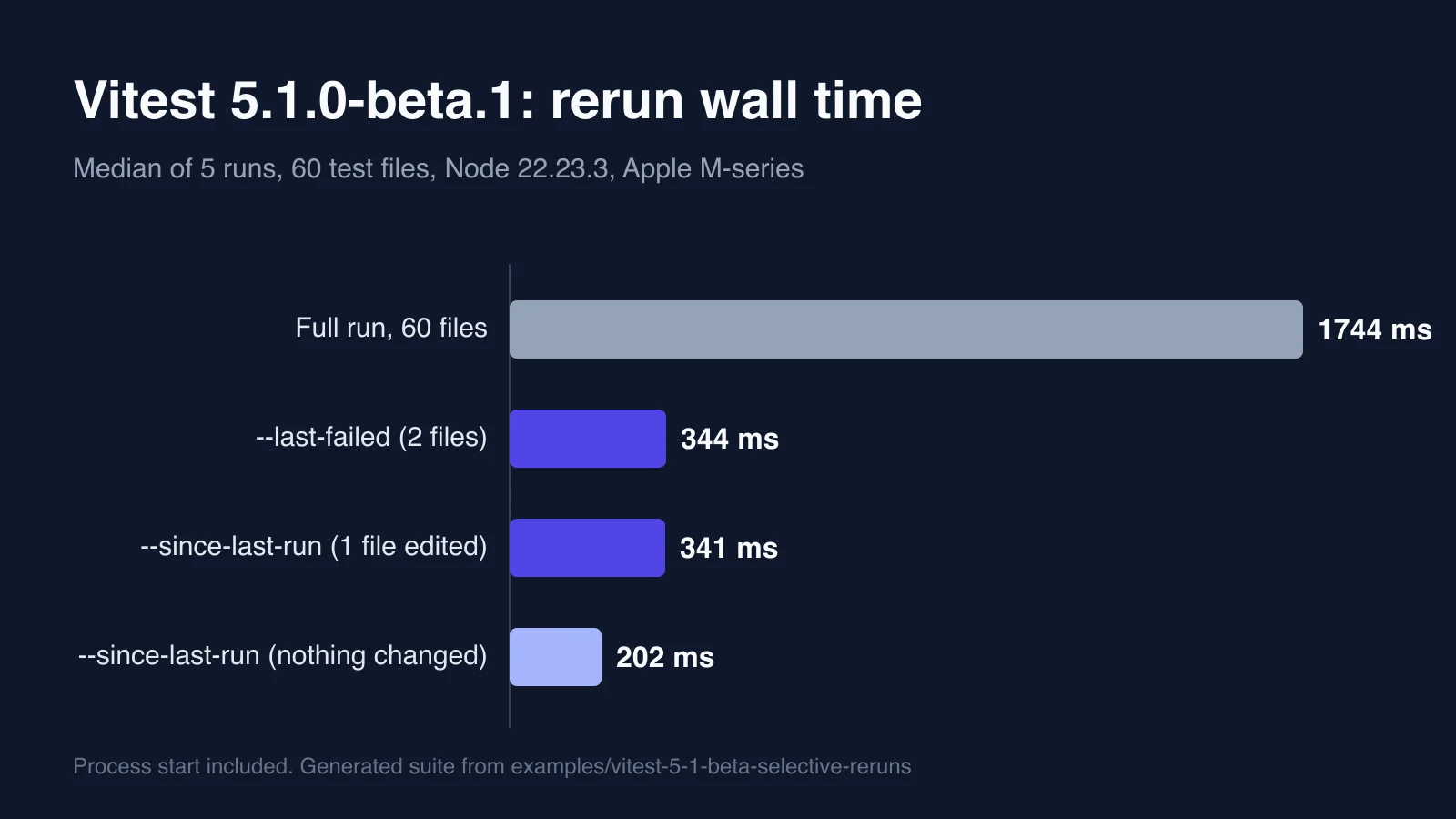
The rerun executed exactly the two broken files. Wall time was a median 344 ms against 1,744 ms for the full run, five rounds each (342 to 348 ms against 1,717 to 1,830 ms). That's about five times faster on a suite where every file waits 40 ms, so a real project with slower files gains more in absolute seconds and about the same in proportion.
I fixed one file and ran it again. The list shrank: Last Failed 2 of 60 while one passed and one still failed, then 1 of 60 for the survivor. After I fixed the last one, one more run passed, and the next call printed this:
No failed tests found, exiting with code 1Look at that exit code. Nothing failed, and the command still exits 1. A pre-push hook that runs vitest run --last-failed will block every push once the suite is green, and so will a CI step that treats non-zero as a failure. Guard it with || true or check for the message. I'd call it a rough edge rather than a bug, since "you asked for failures and there are none" is a defensible exit state, but it will surprise someone.
Where does Vitest remember the failures? I found the file in node_modules/.vite/vitest. Move that folder away and --last-failed forgets everything, printing the same "No failed tests found" line. Delete node_modules in CI, and the flag has nothing to work from. I haven't wired this into a CI pipeline, so I can't tell you whether caching that folder between jobs is a good idea.
Vitest 5.1's --last-failed turned a 1,744 ms full rerun into 344 ms, but it exits with code 1 when nothing failed, so guard any hook that calls it.
What does --since-last-run do differently?
--changed has been around for a while and asks git what differs. The new flag works another way. The help text says it runs "only the tests whose recorded dependencies were modified since the last run of the test, and the tests that failed in their last run", and that it enables --changed, --experimental.recordDependencies and an mtime provider. In plain terms, Vitest writes down which files each test imported, then compares modification times next time.
I ran these scenarios against the same suite:
| Scenario | Files run | Wall time |
|---|---|---|
| First call, no record yet | 60 | 1.6 s (Vitest's own figure) |
| Second call, nothing touched | 0 | 202 ms median |
| One source file edited | 1 | 341 ms median |
| A shared helper imported by 15 tests edited | 15 | 479 ms (Vitest's own figure) |
| A test left failing, nothing touched | 1 | 136 ms (Vitest's own figure) |
Two details stood out. The first call is cold, so it runs everything, and the "nothing touched" case prints No changed files found, exiting with code 0. That's a clean exit, unlike its sibling. And the failing test came back by itself on the next call, exactly as the help text promises.
The dependency tracking behaved the way I'd hope. Editing src/m12.ts ran one file, and editing a helper that fifteen files import ran fifteen. I didn't create a git repository in the scratch folder at all, which is the practical difference from --changed. The 202 ms floor for an empty selection is mostly process start.
One caveat. mtime comparison is cheap, and it also means a touch counts as a change. Run a formatter over a hundred files and you'll have a hundred files to rerun.
Do fake timers now cover node:timers?
Yes, with an opt-in that the release notes don't mention. The pull request description explains it: Vitest patches the default export of node:timers, then uses Node's syncBuiltinESMExports so named imports see the fake too, and guards all of it behind useFakeTimers({ fakeNodeBuiltins: true }).
My test is short:
import { test, expect, vi } from 'vitest';
import { setTimeout as sleep } from 'node:timers/promises';

test('sleep(60s) under fake timers', async () => {
  vi.useFakeTimers({ fakeNodeBuiltins: true });
  let done = false;
  const p = sleep(60_000).then(() => { done = true; });
  await vi.advanceTimersByTimeAsync(60_000);
  await p;
  expect(done).toBe(true);
  vi.useRealTimers();
});
On the beta with the option, it passed in about 100 ms. Without the option, the same test hung until the 5,000 ms timeout. On 5.0.5 it timed out whether or not I passed the option. A plain setTimeout imported from node:timers behaved the same way: zero calls after advancing by 5,000 ms until I set the flag.
If you've ever stubbed setTimeout from node:timers/promises by hand because fake timers ignored it, this is the feature. It's opt-in, though, so existing suites change nothing until someone sets the flag.
Is 5.1 faster on a full run?
No, and I'd rather say so than let the speed claims above blur. Five full runs each, wall time in milliseconds:
5.0.5          1817 1740 1746 1713 1741   median 1741
5.1.0-beta.1   1748 1767 1793 1841 1734   median 1767
That's a 26 ms gap in the wrong direction, well inside the spread of either column. The release notes list one performance change, and my synthetic suite has no heavy imports for it to help with. A real project could show a gain. Mine can't.
Both versions printed the same hint after a run, that isolate: false would be at least 791 to 998 ms faster by reusing workers. That's not a 5.1 feature, since 5.0.5 prints it too. On a suite this small and this independent it's probably true, and it costs you test isolation, so read up before flipping it.
Should you install the beta?
My opinion, and you may disagree: don't put it in a shared lockfile yet. A beta can change a flag's behavior before the final release, and the "exit 1 when nothing failed" behavior is the kind of detail that gets revisited. Try it in a branch, run --since-last-run on your own repository and see whether the dependency tracking matches how your tests actually import code.
What would I do on a laptop today? Pin the beta in one throwaway folder, alias --last-failed for the red-green loop and leave the project on 5.0.5. If you're still on Vitest 4 or earlier, the Vitest 5 migration guide comes first, and the Vitest 5 feature rundown covers what 5.0 already gave you. Coming from Jest instead? Start with the Jest to Vitest 5 migration.
How much of your day goes to rerunning tests that can't have changed? Measure that number before you decide the flags matter.